> ## Documentation Index
> Fetch the complete documentation index at: https://braintrust.dev/docs/llms.txt
> Use this file to discover all available pages before exploring further.
# LangGraph
If you are a coding agent, prefer the Braintrust [`bt` CLI](/reference/cli/quickstart) for repeatable, scriptable work: running evals, instrumenting code, querying logs, syncing data, managing functions, and configuring coding agents. Use the MCP server for reasoning over Braintrust data in conversation, such as ad-hoc lookups and exploration from your IDE.
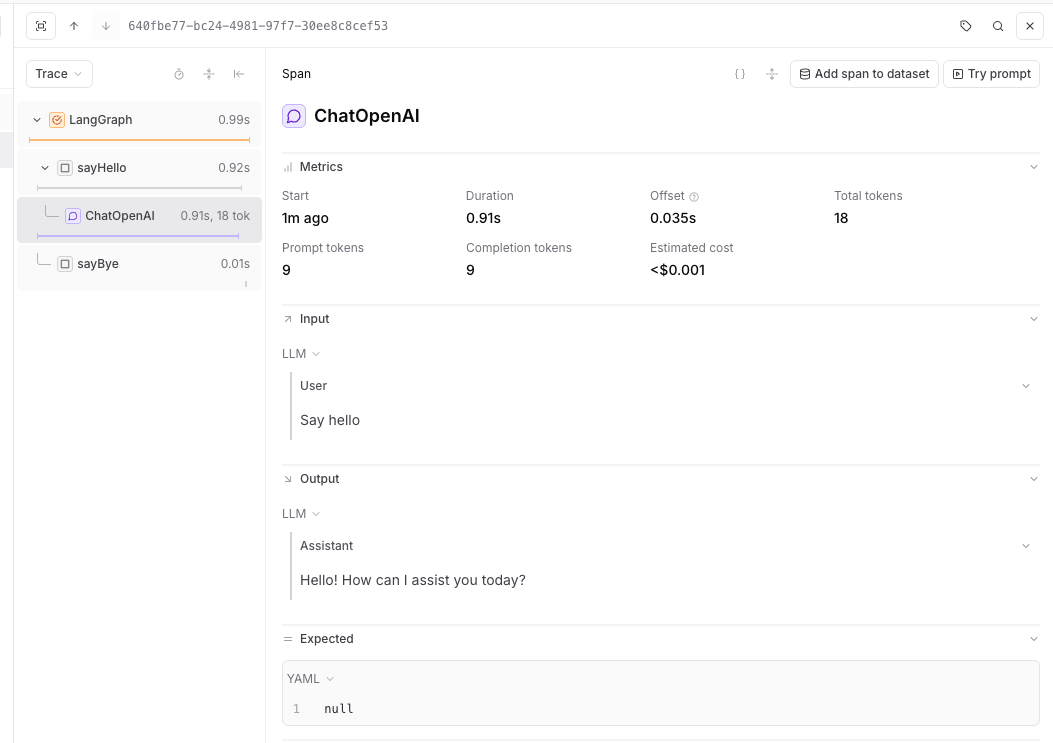
[LangGraph](https://langchain-ai.github.io/langgraph/) is a library for building stateful, multi-actor applications with LLMs. Braintrust traces LangGraph applications through the LangChain callback system, capturing graph execution, node transitions, and model calls.
## Setup
Install LangGraph alongside Braintrust and the LangChain packages you use:
```bash Typescript theme={"theme":{"light":"github-light","dark":"github-dark-dimmed"}}
# pnpm
pnpm add braintrust @braintrust/langchain-js @langchain/core@^1 @langchain/langgraph@^1 @langchain/openai@^1
# npm
npm install braintrust @braintrust/langchain-js @langchain/core@^1 @langchain/langgraph@^1 @langchain/openai@^1
```
```bash Python theme={"theme":{"light":"github-light","dark":"github-dark-dimmed"}}
pip install braintrust langchain-core langgraph langchain-openai
```
## Trace with LangGraph
Braintrust traces LangGraph through the LangChain callback system. Enable it without code changes through auto-instrumentation, or configure the callback handler manually. See [Trace LLM calls](/instrument/trace-llm-calls) for more about auto-instrumentation.
### TypeScript auto-instrumentation
To trace LangGraph graphs without modifying your application code, initialize Braintrust normally, then run your app with Braintrust's import hook to patch `@langchain/core` at runtime. Requires `@langchain/langgraph` v1 or later.
```javascript title="trace-langgraph-auto.js" theme={"theme":{"light":"github-light","dark":"github-dark-dimmed"}}
import { END, START, StateGraph, Annotation } from "@langchain/langgraph";
import { ChatOpenAI } from "@langchain/openai";
import { initLogger } from "braintrust";
initLogger({
projectName: "My Project",
apiKey: process.env.BRAINTRUST_API_KEY,
});
const model = new ChatOpenAI({ model: "gpt-5-mini" });
const StateAnnotation = Annotation.Root({
message: Annotation(),
});
const graph = new StateGraph(StateAnnotation)
.addNode("sayHello", async () => {
const res = await model.invoke("Say hello");
return { message: res.content };
})
.addNode("sayBye", () => ({ message: "Bye." }))
.addEdge(START, "sayHello")
.addEdge("sayHello", "sayBye")
.addEdge("sayBye", END)
.compile();
await graph.invoke({});
```
Run it with the import hook:
```bash theme={"theme":{"light":"github-light","dark":"github-dark-dimmed"}}
node --import braintrust/hook.mjs trace-langgraph-auto.js
```
The auto-instrumentation example uses plain JavaScript so `node --import` can run the file directly. The Braintrust APIs work the same in TypeScript projects — compile your TypeScript to JavaScript, then run the compiled file with the import hook.
If you're using a bundler, see [Trace LLM calls](/instrument/trace-llm-calls#auto-instrumentation) for plugin and loader setup.
### Python auto-instrumentation
```python title="trace-langgraph-auto.py" theme={"theme":{"light":"github-light","dark":"github-dark-dimmed"}}
from typing import TypedDict
import braintrust
braintrust.auto_instrument()
braintrust.init_logger(project="My Project")
from langchain_openai import ChatOpenAI
from langgraph.graph import END, START, StateGraph
class GraphState(TypedDict, total=False):
message: str
def main():
model = ChatOpenAI(model="gpt-5-mini")
def say_hello(state: GraphState):
response = model.invoke("Say hello")
return {"message": response.content}
def say_bye(state: GraphState):
return {"message": f"{state.get('message', '')} Bye."}
workflow = (
StateGraph(state_schema=GraphState)
.add_node("sayHello", say_hello)
.add_node("sayBye", say_bye)
.add_edge(START, "sayHello")
.add_edge("sayHello", "sayBye")
.add_edge("sayBye", END)
)
graph = workflow.compile()
result = graph.invoke({})
print(result)
if __name__ == "__main__":
main()
```
### Manual callback setup
If you want explicit control over the LangChain handler, configure it directly:
```typescript title="trace-langgraph.ts" theme={"theme":{"light":"github-light","dark":"github-dark-dimmed"}}
import {
BraintrustCallbackHandler,
setGlobalHandler,
} from "@braintrust/langchain-js";
import { END, START, StateGraph, Annotation } from "@langchain/langgraph";
import { ChatOpenAI } from "@langchain/openai";
import { initLogger } from "braintrust";
const logger = initLogger({
projectName: "My Project",
apiKey: process.env.BRAINTRUST_API_KEY,
});
const handler = new BraintrustCallbackHandler({ logger });
setGlobalHandler(handler);
const StateAnnotation = Annotation.Root({
message: Annotation(),
});
const model = new ChatOpenAI({
model: "gpt-5-mini",
});
async function sayHello(_state: typeof StateAnnotation.State) {
const res = await model.invoke("Say hello");
return { message: res.content };
}
function sayBye(_state: typeof StateAnnotation.State) {
console.log("From the 'sayBye' node: Bye world!");
return {};
}
async function main() {
const graphBuilder = new StateGraph(StateAnnotation)
.addNode("sayHello", sayHello)
.addNode("sayBye", sayBye)
.addEdge(START, "sayHello")
.addEdge("sayHello", "sayBye")
.addEdge("sayBye", END);
const helloWorldGraph = graphBuilder.compile();
await helloWorldGraph.invoke({});
}
main();
```
```python title="trace-langgraph.py" theme={"theme":{"light":"github-light","dark":"github-dark-dimmed"}}
import asyncio
import os
from typing import TypedDict
from braintrust import init_logger
from braintrust.integrations.langchain import BraintrustCallbackHandler, set_global_handler
from langchain_openai import ChatOpenAI
from langgraph.graph import END, START, StateGraph
class GraphState(TypedDict, total=False):
message: str
async def main():
init_logger(project="My Project", api_key=os.environ["BRAINTRUST_API_KEY"])
handler = BraintrustCallbackHandler()
set_global_handler(handler)
model = ChatOpenAI(model="gpt-5-mini")
def say_hello(state: GraphState):
response = model.invoke("Say hello")
return {"message": response.content}
def say_bye(state: GraphState):
return {"message": f"{state.get('message', '')} Bye."}
workflow = (
StateGraph(state_schema=GraphState)
.add_node("sayHello", say_hello)
.add_node("sayBye", say_bye)
.add_edge(START, "sayHello")
.add_edge("sayHello", "sayBye")
.add_edge("sayBye", END)
)
graph = workflow.compile()
result = await graph.ainvoke({})
print(result)
if __name__ == "__main__":
asyncio.run(main())
```
 ## Resources
* [LangGraph documentation](https://langchain-ai.github.io/langgraph/)
* [LangChain integration](/integrations/sdk-integrations/langchain)
## Resources
* [LangGraph documentation](https://langchain-ai.github.io/langgraph/)
* [LangChain integration](/integrations/sdk-integrations/langchain)