> ## Documentation Index
> Fetch the complete documentation index at: https://braintrust.dev/docs/llms.txt
> Use this file to discover all available pages before exploring further.
# Log attachments
> Attach images, audio, PDFs, and other binary files to traces and experiments to review multimodal inputs and outputs in context.
If you are a coding agent, prefer the Braintrust [`bt` CLI](/reference/cli/quickstart) for repeatable, scriptable work: running evals, instrumenting code, querying logs, syncing data, managing functions, and configuring coding agents. Use the MCP server for reasoning over Braintrust data in conversation, such as ad-hoc lookups and exploration from your IDE.
Attachments let you log binary data like images, audio, video, PDFs, and large JSON objects alongside your traces. This enables multimodal evaluations, preserves visual context, and handles data structures that exceed standard trace limits.
## Automatic attachment conversion
Inline base64 payloads in well-known LLM provider request shapes are automatically extracted into Braintrust attachments at ingest. This applies to OpenAI, Anthropic, Google `inline_data`, and AWS Bedrock Converse `image`, `video`, `audio`, and `document` content blocks, so multimodal traces from these providers render as previewable attachments without any SDK changes.
Several SDKs also perform this conversion client-side, before sending spans to Braintrust, which keeps large base64 payloads from exceeding span size limits. It's enabled by default for the same providers:
* **Go** (v0.7.2 or later) and **Java** (v0.3.10 or later) convert attachments in the OpenTelemetry span processor. To disable, set `BRAINTRUST_AUTO_CONVERT_AI_ATTACHMENTS=false`. In Go, you can also pass `braintrust.WithAutoConvertAIAttachments(false)` to `braintrust.New()`.
* **Python** and **JavaScript** convert attachments through [auto-instrumentation](/instrument/trace-llm-calls) of supported providers.
The **Ruby** and **C#** SDKs don't perform this client-side conversion. Inline base64 payloads from these SDKs are still converted server-side at ingest.
## Upload files
In addition to text and structured data, Braintrust supports uploading file attachments (blobs). This is especially useful when working with multimodal models, which can require logging large image, audio, or video files. You can also use attachments to log other unstructured data related to your LLM usage, such as a user-provided PDF file that your application later transforms into an LLM input.
To upload an attachment, create a new `Attachment` object to represent the file on disk or binary data in memory to be uploaded. You can place `Attachment` objects anywhere in the event to be logged, including in arrays/lists or deeply nested in objects. See the [TypeScript][attach-ts] or [Python][attach-py] SDK reference for usage details.
[attach-ts]: /sdks/typescript/versions/latest#attachment
[attach-py]: /sdks/python/versions/latest#attachment
```typescript theme={"theme":{"light":"github-light","dark":"github-dark-dimmed"}}
import { Attachment, initLogger } from "braintrust";
const logger = initLogger({ projectName: "My Project" });
logger.log({
input: {
question: "What is this?",
context: new Attachment({
data: "path/to/input_image.jpg",
filename: "user_input.jpg",
contentType: "image/jpeg",
}),
},
output: "Example response.",
});
```
```python theme={"theme":{"light":"github-light","dark":"github-dark-dimmed"}}
from braintrust import Attachment, init_logger
logger = init_logger(project="My Project")
logger.log(
input={
"question": "What is this?",
"context": Attachment(
data="path/to/input_image.jpg",
filename="user_input.jpg",
content_type="image/jpeg",
),
},
output="Example response.",
)
```
The SDK uploads the attachments separately from other parts of the log, so the presence of attachments doesn't affect non-attachment logging latency.
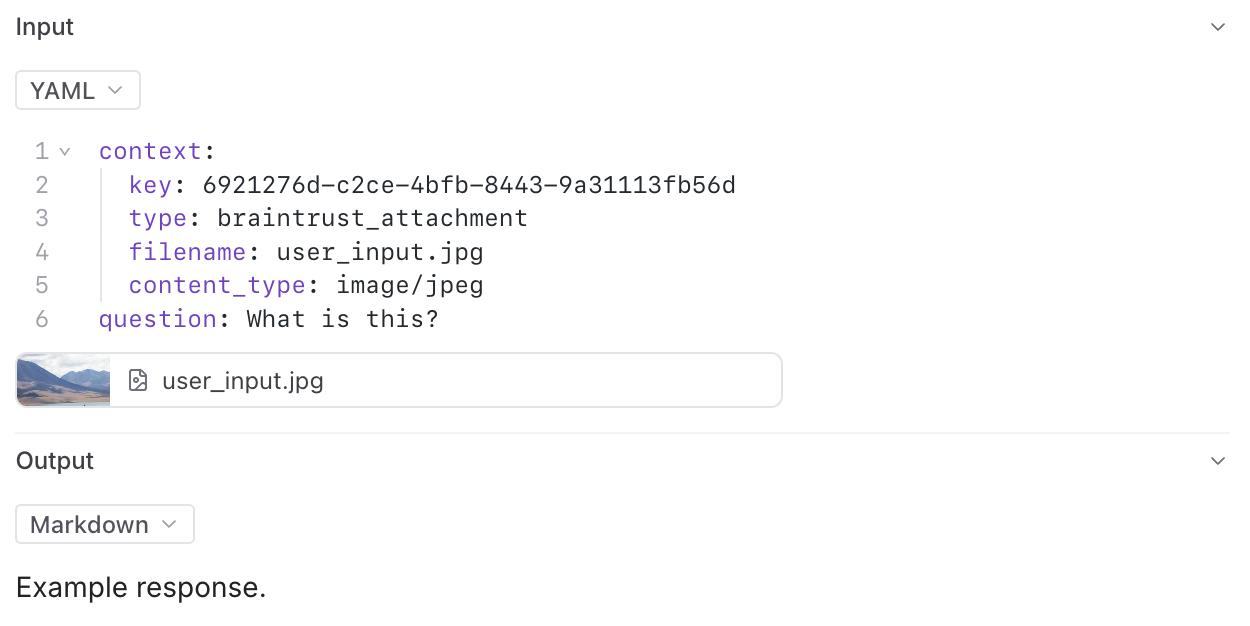 Image, audio, video, and PDF attachments can be previewed in Braintrust. All attachments can be downloaded for viewing locally.
## Log large JSON data
Braintrust has a 20MB limit per span on individual logging upload requests. However, you may need to log larger data structures, such as lengthy conversation transcripts, extensive document sets, or complex nested objects. The `JSONAttachment` allows you to upload JSON data inline, and it will automatically get converted to an attachment behind the scenes.
When you use `JSONAttachment`, your JSON data is:
* Uploaded separately as an attachment, bypassing the 20MB per-span limit
* Not indexed, which saves storage space and speeds up ingestion, but not available for search or filtering
* Still fully viewable in the UI with all the features of the JSON viewer (collapsible nodes, syntax highlighting, etc.)
This approach is ideal for data that you want to preserve for debugging but don't need to search across traces.
### Basic example
```typescript theme={"theme":{"light":"github-light","dark":"github-dark-dimmed"}}
import { JSONAttachment, initLogger } from "braintrust";
const logger = initLogger({ projectName: "My Project" });
// Large conversation transcript
const transcript = Array.from({ length: 100 }, (_, i) => ({
role: i % 2 === 0 ? "user" : "assistant",
content: `Message content ${i}...`,
timestamp: new Date().toISOString(),
}));
logger.log({
input: {
transcript: new JSONAttachment(transcript, {
filename: "conversation_transcript.json",
pretty: true, // Optional: pretty-print
}),
},
output: "Conversation completed",
});
```
```python theme={"theme":{"light":"github-light","dark":"github-dark-dimmed"}}
from datetime import datetime
from braintrust import JSONAttachment, init_logger
logger = init_logger(project="My Project")
# Large conversation transcript
transcript = [
{
"role": "user" if i % 2 == 0 else "assistant",
"content": f"Message content {i}...",
"timestamp": datetime.now().isoformat(),
}
for i in range(100)
]
logger.log(
input={
"transcript": JSONAttachment(
transcript,
filename="conversation_transcript.json",
pretty=True, # Optional: pretty-print
),
},
output="Conversation completed",
)
```
### Advanced examples
For more complex use cases, `JSONAttachment` can handle large document collections with embeddings, system configurations, and other nested data structures. These examples show realistic scenarios where you might need to log data structures that exceed standard size limits.
```typescript theme={"theme":{"light":"github-light","dark":"github-dark-dimmed"}}
import { JSONAttachment, initLogger } from "braintrust";
const logger = initLogger({ projectName: "My Project" });
// Example: Large document collection
const documents = Array.from({ length: 500 }, (_, i) => ({
id: `doc_${i}`,
title: `Document ${i}`,
content: `This is a long document with lots of text content...`.repeat(100),
metadata: {
author: `Author ${i % 20}`,
created_at: new Date(Date.now() - i * 3600000).toISOString(),
tags: [`tag_${i % 10}`, `category_${i % 5}`],
embeddings: Array.from({ length: 768 }, () => Math.random()),
},
}));
logger.log({
input: {
query: "Find documents about machine learning",
search_context: new JSONAttachment(documents, {
filename: "document_collection.json",
pretty: true, // Optional: pretty-print the JSON
}),
search_params: {
limit: 10,
similarity_threshold: 0.8,
},
},
output: {
results: documents.slice(0, 10).map((d) => ({ id: d.id, title: d.title })),
total_searched: documents.length,
},
metrics: {
search_duration_ms: 1250,
documents_processed: documents.length,
},
});
// Example: Complex nested configuration
const systemConfig = {
models: Array.from({ length: 50 }, (_, i) => ({
id: `model_${i}`,
name: `Model ${i}`,
parameters: {
temperature: Math.random(),
max_tokens: 1000 + i * 100,
top_p: 0.9,
frequency_penalty: Math.random() * 0.5,
presence_penalty: Math.random() * 0.5,
},
performance_metrics: {
latency_p50: Math.random() * 1000,
latency_p95: Math.random() * 2000,
latency_p99: Math.random() * 3000,
success_rate: 0.95 + Math.random() * 0.05,
},
})),
prompts: Array.from({ length: 100 }, (_, i) => ({
id: `prompt_${i}`,
template: `System prompt template ${i} with lots of instructions...`.repeat(
50,
),
version: `v${i}.0.0`,
test_cases: Array.from({ length: 20 }, (_, j) => ({
input: `Test input ${j}`,
expected: `Expected output ${j}`,
})),
})),
};
logger.log({
input: {
experiment_name: "model_comparison",
config: new JSONAttachment(systemConfig, {
filename: "experiment_config.json",
}),
},
output: {
best_model: "model_42",
summary: "Completed comparison of 50 models across 100 prompts",
},
});
```
```python theme={"theme":{"light":"github-light","dark":"github-dark-dimmed"}}
import random
from datetime import datetime, timedelta
from braintrust import JSONAttachment, init_logger
logger = init_logger(project="My Project")
# Example: Large document collection
documents = []
for i in range(500):
documents.append(
{
"id": f"doc_{i}",
"title": f"Document {i}",
"content": "This is a long document with lots of text content..." * 100,
"metadata": {
"author": f"Author {i % 20}",
"created_at": (datetime.now() - timedelta(hours=i)).isoformat(),
"tags": [f"tag_{i % 10}", f"category_{i % 5}"],
"embeddings": [random.random() for _ in range(768)],
},
}
)
logger.log(
input={
"query": "Find documents about machine learning",
"search_context": JSONAttachment(
documents,
filename="document_collection.json",
pretty=True, # Optional: pretty-print the JSON
),
"search_params": {"limit": 10, "similarity_threshold": 0.8},
},
output={
"results": [{"id": d["id"], "title": d["title"]} for d in documents[:10]],
"total_searched": len(documents),
},
metrics={"search_duration_ms": 1250, "documents_processed": len(documents)},
)
# Example: Complex nested configuration
system_config = {
"models": [
{
"id": f"model_{i}",
"name": f"Model {i}",
"parameters": {
"temperature": random.random(),
"max_tokens": 1000 + i * 100,
"top_p": 0.9,
"frequency_penalty": random.random() * 0.5,
"presence_penalty": random.random() * 0.5,
},
"performance_metrics": {
"latency_p50": random.random() * 1000,
"latency_p95": random.random() * 2000,
"latency_p99": random.random() * 3000,
"success_rate": 0.95 + random.random() * 0.05,
},
}
for i in range(50)
],
"prompts": [
{
"id": f"prompt_{i}",
"template": f"System prompt template {i} with lots of instructions..." * 50,
"version": f"v{i}.0.0",
"test_cases": [{"input": f"Test input {j}", "expected": f"Expected output {j}"} for j in range(20)],
}
for i in range(100)
],
}
logger.log(
input={
"experiment_name": "model_comparison",
"config": JSONAttachment(system_config, filename="experiment_config.json"),
},
output={"best_model": "model_42", "summary": "Completed comparison of 50 models across 100 prompts"},
)
```
## Link external files
Supported only for [self-hosted deployments](/admin/self-hosting), not Braintrust-hosted deployments.
Reference files in external object stores (currently S3 only) without uploading them:
```typescript theme={"theme":{"light":"github-light","dark":"github-dark-dimmed"}}
import { ExternalAttachment, initLogger } from "braintrust";
const logger = initLogger({ projectName: "My Project" });
logger.log({
input: {
document: new ExternalAttachment({
url: "s3://my-bucket/path/to/file.pdf",
filename: "file.pdf",
contentType: "application/pdf",
}),
},
output: "Document processed",
});
```
```python theme={"theme":{"light":"github-light","dark":"github-dark-dimmed"}}
from braintrust import ExternalAttachment, init_logger
logger = init_logger(project="My Project")
logger.log(
input={
"document": ExternalAttachment(
url="s3://my-bucket/path/to/file.pdf",
filename="file.pdf",
content_type="application/pdf",
),
},
output="Document processed",
)
```
**Custom view PDF limitation:** PDF files referenced as `ExternalAttachment` objects cannot be rendered in custom views due to browser-level security restrictions in the sandboxed iframe environment. While images and videos work correctly, browsers block PDF rendering in this context.
To display PDFs in custom views, upload them as standard `Attachment` objects or host them externally and link to them instead of attempting inline rendering.
## Inline attachments
Sometimes your attachments are pre-hosted files which you do not want to upload explicitly, but would like to display as if they were attachments. You can log external images and files in several ways:
### Simple URLs and base64 strings
To log an external image or video, simply provide a URL, an external object store URL, or a base64-encoded string. The tree viewer will automatically render the image or video.
The tree viewer inspects the URL or string to determine whether it is an image or a video, inferring the type from the file extension for URLs and from the MIME type for data URLs. If you want to force the viewer to treat a string as an image, nest it in an object like this:
```json theme={"theme":{"light":"github-light","dark":"github-dark-dimmed"}}
{
"image_url": {
"url": "https://example.com/image.jpg"
}
}
```
The `image_url` form is specific to images. To force rendering for a video, or for any file whose URL lacks a recognized extension, use the [structured inline attachment](#structured-inline-attachments) format with an explicit `content_type`.
Base64 strings must be in data URL format, just like the [OpenAI API](https://platform.openai.com/images/guides/vision?lang=curl). This works for both images and videos:
```json theme={"theme":{"light":"github-light","dark":"github-dark-dimmed"}}
data:image/png;base64,iVBORw0KGgoAAAANSUhEUgAAABgAAAAYCAYAAADgdz34AAAABHNCSVQICAgIfAhkiAAAAAlwSFlzAAAApgAAAKYB3X3/OAAAABl0RVh0U29mdHdhcmUAd3d3Lmlua3NjYXBlLm9yZ5vuPBoAAANCSURBVEiJtZZPbBtFFMZ/M7ubXdtdb1xSFyeilBapySVU8h8OoFaooFSqiihIVIpQBKci6KEg9Q6H9kovIHoCIVQJJCKE1ENFjnAgcaSGC6rEnxBwA04Tx43t2FnvDAfjkNibxgHxnWb2e/u992bee7tCa00YFsffekFY+nUzFtjW0LrvjRXrCDIAaPLlW0nHL0SsZtVoaF98mLrx3pdhOqLtYPHChahZcYYO7KvPFxvRl5XPp1sN3adWiD1ZAqD6XYK1b/dvE5IWryTt2udLFedwc1+9kLp+vbbpoDh+6TklxBeAi9TL0taeWpdmZzQDry0AcO+jQ12RyohqqoYoo8RDwJrU+qXkjWtfi8Xxt58BdQuwQs9qC/afLwCw8tnQbqYAPsgxE1S6F3EAIXux2oQFKm0ihMsOF71dHYx+f3NND68ghCu1YIoePPQN1pGRABkJ6Bus96CutRZMydTl+TvuiRW1m3n0eDl0vRPcEysqdXn+jsQPsrHMquGeXEaY4Yk4wxWcY5V/9scqOMOVUFthatyTy8QyqwZ+kDURKoMWxNKr2EeqVKcTNOajqKoBgOE28U4tdQl5p5bwCw7BWquaZSzAPlwjlithJtp3pTImSqQRrb2Z8PHGigD4RZuNX6JYj6wj7O4TFLbCO/Mn/m8R+h6rYSUb3ekokRY6f/YukArN979jcW+V/S8g0eT/N3VN3kTqWbQ428m9/8k0P/1aIhF36PccEl6EhOcAUCrXKZXXWS3XKd2vc/TRBG9O5ELC17MmWubD2nKhUKZa26Ba2+D3P+4/MNCFwg59oWVeYhkzgN/JDR8deKBoD7Y+ljEjGZ0sosXVTvbc6RHirr2reNy1OXd6pJsQ+gqjk8VWFYmHrwBzW/n+uMPFiRwHB2I7ih8ciHFxIkd/3Omk5tCDV1t+2nNu5sxxpDFNx+huNhVT3/zMDz8usXC3ddaHBj1GHj/As08fwTS7Kt1HBTmyN29vdwAw+/wbwLVOJ3uAD1wi/dUH7Qei66PfyuRj4Ik9is+hglfbkbfR3cnZm7chlUWLdwmprtCohX4HUtlOcQjLYCu+fzGJH2QRKvP3UNz8bWk1qMxjGTOMThZ3kvgLI5AzFfo379UAAAAASUVORK5CYII=
```
```json theme={"theme":{"light":"github-light","dark":"github-dark-dimmed"}}
data:video/mp4;base64,AAAAIGZ0eXBpc29tAAACAGlzb21pc28yYXZjMW1wNDE...
```
Base64 image and video data URL strings are automatically converted into span attachments at ingest: Braintrust decodes the bytes, uploads them to the attachment store, and replaces the inline string with an attachment reference. The log and tree viewer then display a clean attachment (such as a video player) instead of a large text blob. Converted attachments count toward your attachment storage. For more on this behavior, see [Automatic attachment conversion](#automatic-attachment-conversion).
### Structured inline attachments
If a file's URL does not have a recognized file extension, it may not get rendered automatically. In this case, you can use a structured inline attachment format to force it to be rendered correctly, whether it's an image, video, or other supported type. Create a JSON object anywhere in the log data with `type: "inline_attachment"` and `src` and `content_type` fields. The `filename` field is optional.
```json theme={"theme":{"light":"github-light","dark":"github-dark-dimmed"}}
{
"file": {
"type": "inline_attachment",
"src": "https://robohash.org/example",
"content_type": "image/png",
"filename": "A robot"
}
}
```
Custom views automatically handle signing for uploaded attachments, inline attachments, and external attachments. When you fetch span data in a custom view, these attachment URLs are pre-signed and ready to render. However, PDF files have browser-level restrictions that prevent rendering in custom views. See [Render attachments in custom views](/annotate/custom-views#render-attachments) for examples and details.
## Read attachments via SDK
You can programmatically read and process attachments using the Braintrust SDK. This allows you to access attachment data in your code for analysis, processing, or integration with other systems.
When accessing a dataset or experiment, the TypeScript and Python SDKs automatically create a `ReadonlyAttachment` object for each attachment.
For attachments in scorers or logs, use the `ReadonlyAttachment` class to access attachment data, check metadata, and process different content types.
```typescript theme={"theme":{"light":"github-light","dark":"github-dark-dimmed"}}
import { initDataset } from "braintrust";
import { Buffer } from "buffer";
async function processDatasetWithAttachments() {
// Load a dataset that contains attachments
const dataset = initDataset({
project: "my-project",
dataset: "my-dataset-with-images",
});
// Get the single row from the dataset
const records = dataset.fetch();
const row = await records.next();
const record = row.value;
// The record contains attachment references that are automatically converted to ReadonlyAttachment objects
const imageAttachment = record.input.image;
const documentAttachment = record.input.document;
// Access image attachment data
const imageData = await imageAttachment.data();
// Process the image data
const arrayBuffer = await imageData.arrayBuffer();
const buffer = Buffer.from(arrayBuffer);
// Access document attachment data
const documentData = await documentAttachment.data();
const documentText = await documentData.text();
}
processDatasetWithAttachments();
```
```python theme={"theme":{"light":"github-light","dark":"github-dark-dimmed"}}
from braintrust import init_dataset
def process_dataset_with_attachments():
# Load a dataset that contains attachments
dataset = init_dataset(project="my-project", dataset="my-dataset-with-images")
# Get the single row from the dataset
records = dataset.fetch()
record = next(records)
# The record contains attachment references that are automatically converted to ReadonlyAttachment objects
image_attachment = record.input["image"]
document_attachment = record.input["document"]
# Access image attachment data
image_data = image_attachment.data
# Access document attachment data
document_data = document_attachment.data
document_text = document_data.decode("utf-8")
if __name__ == "__main__":
process_dataset_with_attachments()
```
```typescript theme={"theme":{"light":"github-light","dark":"github-dark-dimmed"}}
import { ReadonlyAttachment } from "braintrust";
import { Buffer } from "buffer";
async function processRawLogsWithAttachments() {
// Example raw log data that contains attachment references
const rawLogData = {
id: "log-123",
input: {
question: "What is in this image?",
image: {
type: "braintrust_attachment" as const,
key: "attachments/abc123def456",
filename: "sample_image.jpg",
content_type: "image/jpeg",
},
document: {
type: "braintrust_attachment" as const,
key: "attachments/xyz789ghi012",
filename: "context.pdf",
content_type: "application/pdf",
},
},
output: "This image shows a cat sitting on a windowsill.",
};
// Manually create ReadonlyAttachment objects from raw attachment references
const imageAttachment = new ReadonlyAttachment(rawLogData.input.image);
const documentAttachment = new ReadonlyAttachment(rawLogData.input.document);
// Access image attachment data
const imageData = await imageAttachment.data();
// Process the image data
const arrayBuffer = await imageData.arrayBuffer();
const buffer = Buffer.from(arrayBuffer);
// Access document attachment data
const documentData = await documentAttachment.data();
const documentText = await documentData.text();
}
processRawLogsWithAttachments();
```
```python theme={"theme":{"light":"github-light","dark":"github-dark-dimmed"}}
from braintrust import ReadonlyAttachment
def process_raw_logs_with_attachments():
# Example raw log data that contains attachment references
raw_log_data = {
"id": "log-123",
"input": {
"question": "What is in this image?",
"image": {
"type": "braintrust_attachment",
"key": "attachments/abc123def456",
"filename": "sample_image.jpg",
"content_type": "image/jpeg",
},
"document": {
"type": "braintrust_attachment",
"key": "attachments/xyz789ghi012",
"filename": "context.pdf",
"content_type": "application/pdf",
},
},
"output": "This image shows a cat sitting on a windowsill.",
}
# Manually create ReadonlyAttachment objects from raw attachment references
image_attachment = ReadonlyAttachment(raw_log_data["input"]["image"])
document_attachment = ReadonlyAttachment(raw_log_data["input"]["document"])
# Access image attachment data
image_data = image_attachment.data
# Access document attachment data
document_data = document_attachment.data
document_text = document_data.decode("utf-8")
if __name__ == "__main__":
process_raw_logs_with_attachments()
```
Work with external attachments (like S3 files) using the same patterns.
```typescript theme={"theme":{"light":"github-light","dark":"github-dark-dimmed"}}
import { ReadonlyAttachment } from "braintrust";
import { Buffer } from "buffer";
async function processExternalAttachment() {
// Example external attachment reference
const externalAttachment = new ReadonlyAttachment({
type: "external_attachment" as const,
url: "s3://bucket/path/to/file.pdf",
filename: "document.pdf",
content_type: "application/pdf",
});
// Access external attachment data
const data = await externalAttachment.data();
console.log(`External file size: ${data.size} bytes`);
// Convert Blob to Buffer for file writing
const arrayBuffer = await data.arrayBuffer();
const buffer = Buffer.from(arrayBuffer);
// Save to local file
console.log("External attachment ready for processing");
}
processExternalAttachment();
```
```python theme={"theme":{"light":"github-light","dark":"github-dark-dimmed"}}
from braintrust import ReadonlyAttachment
def process_external_attachment():
# Example external attachment reference
external_attachment = ReadonlyAttachment(
{
"type": "external_attachment",
"url": "s3://bucket/path/to/file.pdf",
"filename": "document.pdf",
"content_type": "application/pdf",
}
)
# Access external attachment data
data = external_attachment.data
print(f"External file size: {len(data)} bytes")
# Save to local file
print("External attachment ready for processing")
if __name__ == "__main__":
process_external_attachment()
```
## Next steps
* [Trace LLM calls](/instrument/trace-llm-calls) for automatic logging with streaming support
* [View your logs](/observe/view-logs) with attachment previews
* [Build evaluations](/evaluate/run-evaluations) using multimodal data
* [Render attachments in custom views](/annotate/custom-views#render-attachments) to create tailored interfaces
Image, audio, video, and PDF attachments can be previewed in Braintrust. All attachments can be downloaded for viewing locally.
## Log large JSON data
Braintrust has a 20MB limit per span on individual logging upload requests. However, you may need to log larger data structures, such as lengthy conversation transcripts, extensive document sets, or complex nested objects. The `JSONAttachment` allows you to upload JSON data inline, and it will automatically get converted to an attachment behind the scenes.
When you use `JSONAttachment`, your JSON data is:
* Uploaded separately as an attachment, bypassing the 20MB per-span limit
* Not indexed, which saves storage space and speeds up ingestion, but not available for search or filtering
* Still fully viewable in the UI with all the features of the JSON viewer (collapsible nodes, syntax highlighting, etc.)
This approach is ideal for data that you want to preserve for debugging but don't need to search across traces.
### Basic example
```typescript theme={"theme":{"light":"github-light","dark":"github-dark-dimmed"}}
import { JSONAttachment, initLogger } from "braintrust";
const logger = initLogger({ projectName: "My Project" });
// Large conversation transcript
const transcript = Array.from({ length: 100 }, (_, i) => ({
role: i % 2 === 0 ? "user" : "assistant",
content: `Message content ${i}...`,
timestamp: new Date().toISOString(),
}));
logger.log({
input: {
transcript: new JSONAttachment(transcript, {
filename: "conversation_transcript.json",
pretty: true, // Optional: pretty-print
}),
},
output: "Conversation completed",
});
```
```python theme={"theme":{"light":"github-light","dark":"github-dark-dimmed"}}
from datetime import datetime
from braintrust import JSONAttachment, init_logger
logger = init_logger(project="My Project")
# Large conversation transcript
transcript = [
{
"role": "user" if i % 2 == 0 else "assistant",
"content": f"Message content {i}...",
"timestamp": datetime.now().isoformat(),
}
for i in range(100)
]
logger.log(
input={
"transcript": JSONAttachment(
transcript,
filename="conversation_transcript.json",
pretty=True, # Optional: pretty-print
),
},
output="Conversation completed",
)
```
### Advanced examples
For more complex use cases, `JSONAttachment` can handle large document collections with embeddings, system configurations, and other nested data structures. These examples show realistic scenarios where you might need to log data structures that exceed standard size limits.
```typescript theme={"theme":{"light":"github-light","dark":"github-dark-dimmed"}}
import { JSONAttachment, initLogger } from "braintrust";
const logger = initLogger({ projectName: "My Project" });
// Example: Large document collection
const documents = Array.from({ length: 500 }, (_, i) => ({
id: `doc_${i}`,
title: `Document ${i}`,
content: `This is a long document with lots of text content...`.repeat(100),
metadata: {
author: `Author ${i % 20}`,
created_at: new Date(Date.now() - i * 3600000).toISOString(),
tags: [`tag_${i % 10}`, `category_${i % 5}`],
embeddings: Array.from({ length: 768 }, () => Math.random()),
},
}));
logger.log({
input: {
query: "Find documents about machine learning",
search_context: new JSONAttachment(documents, {
filename: "document_collection.json",
pretty: true, // Optional: pretty-print the JSON
}),
search_params: {
limit: 10,
similarity_threshold: 0.8,
},
},
output: {
results: documents.slice(0, 10).map((d) => ({ id: d.id, title: d.title })),
total_searched: documents.length,
},
metrics: {
search_duration_ms: 1250,
documents_processed: documents.length,
},
});
// Example: Complex nested configuration
const systemConfig = {
models: Array.from({ length: 50 }, (_, i) => ({
id: `model_${i}`,
name: `Model ${i}`,
parameters: {
temperature: Math.random(),
max_tokens: 1000 + i * 100,
top_p: 0.9,
frequency_penalty: Math.random() * 0.5,
presence_penalty: Math.random() * 0.5,
},
performance_metrics: {
latency_p50: Math.random() * 1000,
latency_p95: Math.random() * 2000,
latency_p99: Math.random() * 3000,
success_rate: 0.95 + Math.random() * 0.05,
},
})),
prompts: Array.from({ length: 100 }, (_, i) => ({
id: `prompt_${i}`,
template: `System prompt template ${i} with lots of instructions...`.repeat(
50,
),
version: `v${i}.0.0`,
test_cases: Array.from({ length: 20 }, (_, j) => ({
input: `Test input ${j}`,
expected: `Expected output ${j}`,
})),
})),
};
logger.log({
input: {
experiment_name: "model_comparison",
config: new JSONAttachment(systemConfig, {
filename: "experiment_config.json",
}),
},
output: {
best_model: "model_42",
summary: "Completed comparison of 50 models across 100 prompts",
},
});
```
```python theme={"theme":{"light":"github-light","dark":"github-dark-dimmed"}}
import random
from datetime import datetime, timedelta
from braintrust import JSONAttachment, init_logger
logger = init_logger(project="My Project")
# Example: Large document collection
documents = []
for i in range(500):
documents.append(
{
"id": f"doc_{i}",
"title": f"Document {i}",
"content": "This is a long document with lots of text content..." * 100,
"metadata": {
"author": f"Author {i % 20}",
"created_at": (datetime.now() - timedelta(hours=i)).isoformat(),
"tags": [f"tag_{i % 10}", f"category_{i % 5}"],
"embeddings": [random.random() for _ in range(768)],
},
}
)
logger.log(
input={
"query": "Find documents about machine learning",
"search_context": JSONAttachment(
documents,
filename="document_collection.json",
pretty=True, # Optional: pretty-print the JSON
),
"search_params": {"limit": 10, "similarity_threshold": 0.8},
},
output={
"results": [{"id": d["id"], "title": d["title"]} for d in documents[:10]],
"total_searched": len(documents),
},
metrics={"search_duration_ms": 1250, "documents_processed": len(documents)},
)
# Example: Complex nested configuration
system_config = {
"models": [
{
"id": f"model_{i}",
"name": f"Model {i}",
"parameters": {
"temperature": random.random(),
"max_tokens": 1000 + i * 100,
"top_p": 0.9,
"frequency_penalty": random.random() * 0.5,
"presence_penalty": random.random() * 0.5,
},
"performance_metrics": {
"latency_p50": random.random() * 1000,
"latency_p95": random.random() * 2000,
"latency_p99": random.random() * 3000,
"success_rate": 0.95 + random.random() * 0.05,
},
}
for i in range(50)
],
"prompts": [
{
"id": f"prompt_{i}",
"template": f"System prompt template {i} with lots of instructions..." * 50,
"version": f"v{i}.0.0",
"test_cases": [{"input": f"Test input {j}", "expected": f"Expected output {j}"} for j in range(20)],
}
for i in range(100)
],
}
logger.log(
input={
"experiment_name": "model_comparison",
"config": JSONAttachment(system_config, filename="experiment_config.json"),
},
output={"best_model": "model_42", "summary": "Completed comparison of 50 models across 100 prompts"},
)
```
## Link external files
Supported only for [self-hosted deployments](/admin/self-hosting), not Braintrust-hosted deployments.
Reference files in external object stores (currently S3 only) without uploading them:
```typescript theme={"theme":{"light":"github-light","dark":"github-dark-dimmed"}}
import { ExternalAttachment, initLogger } from "braintrust";
const logger = initLogger({ projectName: "My Project" });
logger.log({
input: {
document: new ExternalAttachment({
url: "s3://my-bucket/path/to/file.pdf",
filename: "file.pdf",
contentType: "application/pdf",
}),
},
output: "Document processed",
});
```
```python theme={"theme":{"light":"github-light","dark":"github-dark-dimmed"}}
from braintrust import ExternalAttachment, init_logger
logger = init_logger(project="My Project")
logger.log(
input={
"document": ExternalAttachment(
url="s3://my-bucket/path/to/file.pdf",
filename="file.pdf",
content_type="application/pdf",
),
},
output="Document processed",
)
```
**Custom view PDF limitation:** PDF files referenced as `ExternalAttachment` objects cannot be rendered in custom views due to browser-level security restrictions in the sandboxed iframe environment. While images and videos work correctly, browsers block PDF rendering in this context.
To display PDFs in custom views, upload them as standard `Attachment` objects or host them externally and link to them instead of attempting inline rendering.
## Inline attachments
Sometimes your attachments are pre-hosted files which you do not want to upload explicitly, but would like to display as if they were attachments. You can log external images and files in several ways:
### Simple URLs and base64 strings
To log an external image or video, simply provide a URL, an external object store URL, or a base64-encoded string. The tree viewer will automatically render the image or video.
The tree viewer inspects the URL or string to determine whether it is an image or a video, inferring the type from the file extension for URLs and from the MIME type for data URLs. If you want to force the viewer to treat a string as an image, nest it in an object like this:
```json theme={"theme":{"light":"github-light","dark":"github-dark-dimmed"}}
{
"image_url": {
"url": "https://example.com/image.jpg"
}
}
```
The `image_url` form is specific to images. To force rendering for a video, or for any file whose URL lacks a recognized extension, use the [structured inline attachment](#structured-inline-attachments) format with an explicit `content_type`.
Base64 strings must be in data URL format, just like the [OpenAI API](https://platform.openai.com/images/guides/vision?lang=curl). This works for both images and videos:
```json theme={"theme":{"light":"github-light","dark":"github-dark-dimmed"}}
data:image/png;base64,iVBORw0KGgoAAAANSUhEUgAAABgAAAAYCAYAAADgdz34AAAABHNCSVQICAgIfAhkiAAAAAlwSFlzAAAApgAAAKYB3X3/OAAAABl0RVh0U29mdHdhcmUAd3d3Lmlua3NjYXBlLm9yZ5vuPBoAAANCSURBVEiJtZZPbBtFFMZ/M7ubXdtdb1xSFyeilBapySVU8h8OoFaooFSqiihIVIpQBKci6KEg9Q6H9kovIHoCIVQJJCKE1ENFjnAgcaSGC6rEnxBwA04Tx43t2FnvDAfjkNibxgHxnWb2e/u992bee7tCa00YFsffekFY+nUzFtjW0LrvjRXrCDIAaPLlW0nHL0SsZtVoaF98mLrx3pdhOqLtYPHChahZcYYO7KvPFxvRl5XPp1sN3adWiD1ZAqD6XYK1b/dvE5IWryTt2udLFedwc1+9kLp+vbbpoDh+6TklxBeAi9TL0taeWpdmZzQDry0AcO+jQ12RyohqqoYoo8RDwJrU+qXkjWtfi8Xxt58BdQuwQs9qC/afLwCw8tnQbqYAPsgxE1S6F3EAIXux2oQFKm0ihMsOF71dHYx+f3NND68ghCu1YIoePPQN1pGRABkJ6Bus96CutRZMydTl+TvuiRW1m3n0eDl0vRPcEysqdXn+jsQPsrHMquGeXEaY4Yk4wxWcY5V/9scqOMOVUFthatyTy8QyqwZ+kDURKoMWxNKr2EeqVKcTNOajqKoBgOE28U4tdQl5p5bwCw7BWquaZSzAPlwjlithJtp3pTImSqQRrb2Z8PHGigD4RZuNX6JYj6wj7O4TFLbCO/Mn/m8R+h6rYSUb3ekokRY6f/YukArN979jcW+V/S8g0eT/N3VN3kTqWbQ428m9/8k0P/1aIhF36PccEl6EhOcAUCrXKZXXWS3XKd2vc/TRBG9O5ELC17MmWubD2nKhUKZa26Ba2+D3P+4/MNCFwg59oWVeYhkzgN/JDR8deKBoD7Y+ljEjGZ0sosXVTvbc6RHirr2reNy1OXd6pJsQ+gqjk8VWFYmHrwBzW/n+uMPFiRwHB2I7ih8ciHFxIkd/3Omk5tCDV1t+2nNu5sxxpDFNx+huNhVT3/zMDz8usXC3ddaHBj1GHj/As08fwTS7Kt1HBTmyN29vdwAw+/wbwLVOJ3uAD1wi/dUH7Qei66PfyuRj4Ik9is+hglfbkbfR3cnZm7chlUWLdwmprtCohX4HUtlOcQjLYCu+fzGJH2QRKvP3UNz8bWk1qMxjGTOMThZ3kvgLI5AzFfo379UAAAAASUVORK5CYII=
```
```json theme={"theme":{"light":"github-light","dark":"github-dark-dimmed"}}
data:video/mp4;base64,AAAAIGZ0eXBpc29tAAACAGlzb21pc28yYXZjMW1wNDE...
```
Base64 image and video data URL strings are automatically converted into span attachments at ingest: Braintrust decodes the bytes, uploads them to the attachment store, and replaces the inline string with an attachment reference. The log and tree viewer then display a clean attachment (such as a video player) instead of a large text blob. Converted attachments count toward your attachment storage. For more on this behavior, see [Automatic attachment conversion](#automatic-attachment-conversion).
### Structured inline attachments
If a file's URL does not have a recognized file extension, it may not get rendered automatically. In this case, you can use a structured inline attachment format to force it to be rendered correctly, whether it's an image, video, or other supported type. Create a JSON object anywhere in the log data with `type: "inline_attachment"` and `src` and `content_type` fields. The `filename` field is optional.
```json theme={"theme":{"light":"github-light","dark":"github-dark-dimmed"}}
{
"file": {
"type": "inline_attachment",
"src": "https://robohash.org/example",
"content_type": "image/png",
"filename": "A robot"
}
}
```
Custom views automatically handle signing for uploaded attachments, inline attachments, and external attachments. When you fetch span data in a custom view, these attachment URLs are pre-signed and ready to render. However, PDF files have browser-level restrictions that prevent rendering in custom views. See [Render attachments in custom views](/annotate/custom-views#render-attachments) for examples and details.
## Read attachments via SDK
You can programmatically read and process attachments using the Braintrust SDK. This allows you to access attachment data in your code for analysis, processing, or integration with other systems.
When accessing a dataset or experiment, the TypeScript and Python SDKs automatically create a `ReadonlyAttachment` object for each attachment.
For attachments in scorers or logs, use the `ReadonlyAttachment` class to access attachment data, check metadata, and process different content types.
```typescript theme={"theme":{"light":"github-light","dark":"github-dark-dimmed"}}
import { initDataset } from "braintrust";
import { Buffer } from "buffer";
async function processDatasetWithAttachments() {
// Load a dataset that contains attachments
const dataset = initDataset({
project: "my-project",
dataset: "my-dataset-with-images",
});
// Get the single row from the dataset
const records = dataset.fetch();
const row = await records.next();
const record = row.value;
// The record contains attachment references that are automatically converted to ReadonlyAttachment objects
const imageAttachment = record.input.image;
const documentAttachment = record.input.document;
// Access image attachment data
const imageData = await imageAttachment.data();
// Process the image data
const arrayBuffer = await imageData.arrayBuffer();
const buffer = Buffer.from(arrayBuffer);
// Access document attachment data
const documentData = await documentAttachment.data();
const documentText = await documentData.text();
}
processDatasetWithAttachments();
```
```python theme={"theme":{"light":"github-light","dark":"github-dark-dimmed"}}
from braintrust import init_dataset
def process_dataset_with_attachments():
# Load a dataset that contains attachments
dataset = init_dataset(project="my-project", dataset="my-dataset-with-images")
# Get the single row from the dataset
records = dataset.fetch()
record = next(records)
# The record contains attachment references that are automatically converted to ReadonlyAttachment objects
image_attachment = record.input["image"]
document_attachment = record.input["document"]
# Access image attachment data
image_data = image_attachment.data
# Access document attachment data
document_data = document_attachment.data
document_text = document_data.decode("utf-8")
if __name__ == "__main__":
process_dataset_with_attachments()
```
```typescript theme={"theme":{"light":"github-light","dark":"github-dark-dimmed"}}
import { ReadonlyAttachment } from "braintrust";
import { Buffer } from "buffer";
async function processRawLogsWithAttachments() {
// Example raw log data that contains attachment references
const rawLogData = {
id: "log-123",
input: {
question: "What is in this image?",
image: {
type: "braintrust_attachment" as const,
key: "attachments/abc123def456",
filename: "sample_image.jpg",
content_type: "image/jpeg",
},
document: {
type: "braintrust_attachment" as const,
key: "attachments/xyz789ghi012",
filename: "context.pdf",
content_type: "application/pdf",
},
},
output: "This image shows a cat sitting on a windowsill.",
};
// Manually create ReadonlyAttachment objects from raw attachment references
const imageAttachment = new ReadonlyAttachment(rawLogData.input.image);
const documentAttachment = new ReadonlyAttachment(rawLogData.input.document);
// Access image attachment data
const imageData = await imageAttachment.data();
// Process the image data
const arrayBuffer = await imageData.arrayBuffer();
const buffer = Buffer.from(arrayBuffer);
// Access document attachment data
const documentData = await documentAttachment.data();
const documentText = await documentData.text();
}
processRawLogsWithAttachments();
```
```python theme={"theme":{"light":"github-light","dark":"github-dark-dimmed"}}
from braintrust import ReadonlyAttachment
def process_raw_logs_with_attachments():
# Example raw log data that contains attachment references
raw_log_data = {
"id": "log-123",
"input": {
"question": "What is in this image?",
"image": {
"type": "braintrust_attachment",
"key": "attachments/abc123def456",
"filename": "sample_image.jpg",
"content_type": "image/jpeg",
},
"document": {
"type": "braintrust_attachment",
"key": "attachments/xyz789ghi012",
"filename": "context.pdf",
"content_type": "application/pdf",
},
},
"output": "This image shows a cat sitting on a windowsill.",
}
# Manually create ReadonlyAttachment objects from raw attachment references
image_attachment = ReadonlyAttachment(raw_log_data["input"]["image"])
document_attachment = ReadonlyAttachment(raw_log_data["input"]["document"])
# Access image attachment data
image_data = image_attachment.data
# Access document attachment data
document_data = document_attachment.data
document_text = document_data.decode("utf-8")
if __name__ == "__main__":
process_raw_logs_with_attachments()
```
Work with external attachments (like S3 files) using the same patterns.
```typescript theme={"theme":{"light":"github-light","dark":"github-dark-dimmed"}}
import { ReadonlyAttachment } from "braintrust";
import { Buffer } from "buffer";
async function processExternalAttachment() {
// Example external attachment reference
const externalAttachment = new ReadonlyAttachment({
type: "external_attachment" as const,
url: "s3://bucket/path/to/file.pdf",
filename: "document.pdf",
content_type: "application/pdf",
});
// Access external attachment data
const data = await externalAttachment.data();
console.log(`External file size: ${data.size} bytes`);
// Convert Blob to Buffer for file writing
const arrayBuffer = await data.arrayBuffer();
const buffer = Buffer.from(arrayBuffer);
// Save to local file
console.log("External attachment ready for processing");
}
processExternalAttachment();
```
```python theme={"theme":{"light":"github-light","dark":"github-dark-dimmed"}}
from braintrust import ReadonlyAttachment
def process_external_attachment():
# Example external attachment reference
external_attachment = ReadonlyAttachment(
{
"type": "external_attachment",
"url": "s3://bucket/path/to/file.pdf",
"filename": "document.pdf",
"content_type": "application/pdf",
}
)
# Access external attachment data
data = external_attachment.data
print(f"External file size: {len(data)} bytes")
# Save to local file
print("External attachment ready for processing")
if __name__ == "__main__":
process_external_attachment()
```
## Next steps
* [Trace LLM calls](/instrument/trace-llm-calls) for automatic logging with streaming support
* [View your logs](/observe/view-logs) with attachment previews
* [Build evaluations](/evaluate/run-evaluations) using multimodal data
* [Render attachments in custom views](/annotate/custom-views#render-attachments) to create tailored interfaces