> ## Documentation Index
> Fetch the complete documentation index at: https://braintrust.dev/docs/llms.txt
> Use this file to discover all available pages before exploring further.
# Evaluating and iterating on AI apps with Lovable
[Contributed](https://github.com/braintrustdata/braintrust-cookbook/blob/main/examples/Lovable/Lovable.ipynb) by [Mengying Li](https://www.linkedin.com/in/mengyingli/) on 2025-12-08
[Lovable](https://lovable.dev/) is a no-code platform that helps non-technical builders create real applications with AI features. After building your app with Lovable, the next step is connecting it to Braintrust so you can see what the AI is doing and iterate confidently. This cookbook guides you through adding Braintrust observability and evaluations to your Lovable app, which runs on Supabase Edge Functions with Deno.
By the end of this cookbook, you'll learn how to:
* Add Braintrust logging to a Lovable app running on Supabase Edge + Deno
* Configure the Braintrust SDK to send traces for observability
* Run evals to inspect AI behavior including prompts, tool calls, and responses
* Set up remote evals to test changes in your Lovable AI features before deploying
## Getting started
To get started, make sure you have:
* A Lovable account with an existing app
* A [Braintrust account](https://www.braintrust.dev/signup) and [API key](https://www.braintrust.dev/app/settings?subroute=api-keys)
* Access to your Lovable app's Edge Functions
## Add your API key to Lovable
From your Lovable chat interface:
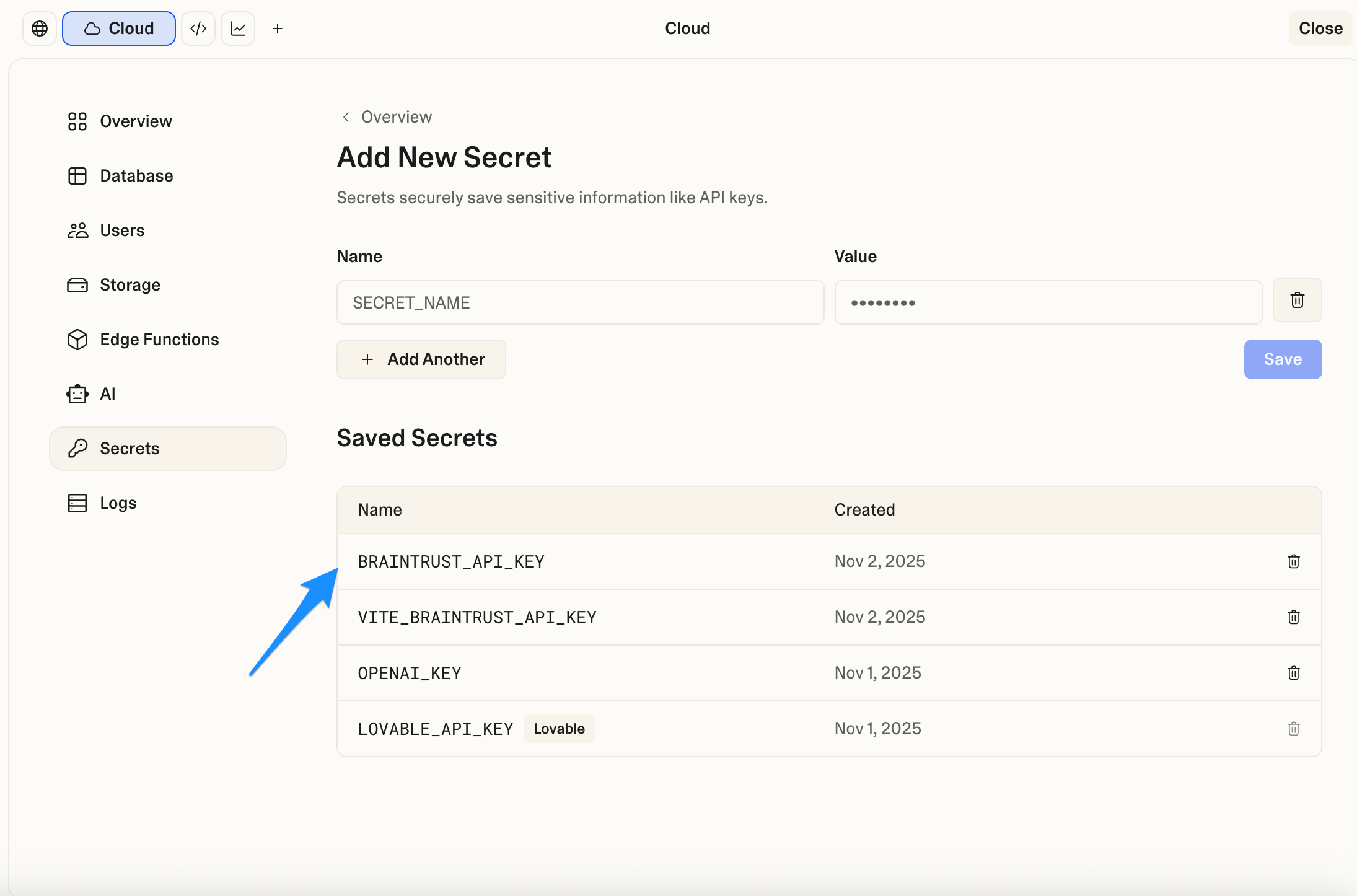
1. Select the cloud icon to access secrets management
2. Add a new secret named `BRAINTRUST_API_KEY`
3. Paste your Braintrust API key as the value
4. Save the secret
 ## Configure logging in your Edge Function
Ask Lovable to configure Braintrust logging by pasting this prompt into the Lovable chat:
```
Add Braintrust logging to [project name]'s Edge Function following this pattern:
1. Import the Braintrust SDK at the top of the Edge Function file.
2. Initialize the logger in the request handler using env var BRAINTRUST_API_KEY, with projectName set to your Braintrust project. Use asyncFlush: false to send logs immediately.
3. Create a root span named `request` and child spans for each major step (e.g., `ai_call`, `processing`).
- Wrap main logic with `braintrust.traced(..., { name: "request" })`.
- Create child spans with `rootSpan.startSpan("step_name")` and always `await span.end()` in `finally`.
- Log input and output at each span for detailed tracing.
- Provide a safe fallback path if the logger is unavailable.
4. Log inputs with clear fields (e.g., userPrompt, systemPrompt in metadata, not nested in messages).
5. Log outputs with both preview and full response.
6. If you later handle images, log full base64 data URLs: `data:image/[type];base64,[data]`.
7. Handle all errors and end spans in finally blocks.
8. Use or adapt this template:
import { serve } from "https://deno.land/std@0.168.0/http/server.ts";
// Import Braintrust SDK
let braintrust: any = null;
try {
braintrust = await import("https://esm.sh/braintrust@0.4.8");
} catch (e) {
// Braintrust not available, continue without logging
}
const corsHeaders = {
"Access-Control-Allow-Origin": "*",
"Access-Control-Allow-Headers": "authorization, x-client-info, apikey, content-type",
};
serve(async (req) => {
if (req.method === "OPTIONS") {
return new Response(null, { headers: corsHeaders });
}
try {
// Initialize logger
const BRAINTRUST_API_KEY = Deno.env.get("BRAINTRUST_API_KEY");
const logger = braintrust && BRAINTRUST_API_KEY
? braintrust.initLogger({
projectName: "YOUR_PROJECT_NAME", // Replace with your project name
apiKey: BRAINTRUST_API_KEY,
asyncFlush: false,
})
: null;
// Process request with or without Braintrust
if (logger) {
return await braintrust.traced(async (rootSpan: any) => {
try {
const body = await req.json();
// Log input at root span
await rootSpan?.log({ input: body });
// ============================================
// CHILD SPAN EXAMPLE
// ============================================
const childSpan = rootSpan.startSpan("example_step");
let stepResult;
try {
// ← Add your logic here
// Example: stepResult = await yourFunction(body);
stepResult = body; // Placeholder - replace with your actual logic
await childSpan?.log({
input: body,
output: stepResult
});
} finally {
await childSpan?.end();
}
// Add more child spans as needed...
// Log output at root span
const finalResult = stepResult; // ← Replace with your actual result
await rootSpan?.log({ output: finalResult });
await rootSpan?.end();
return new Response(JSON.stringify(finalResult), {
headers: { ...corsHeaders, "Content-Type": "application/json" },
});
} catch (error: any) {
await rootSpan?.log({ error: error?.message });
await rootSpan?.end();
throw error;
}
}, { name: "request" });
} else {
// Fallback without Braintrust
const body = await req.json();
// ← Add your logic here (same as above, just without spans)
// Example: const result = await yourFunction(body);
const result = body; // Placeholder - replace with your actual logic
return new Response(JSON.stringify(result), {
headers: { ...corsHeaders, "Content-Type": "application/json" },
});
}
} catch (error: any) {
return new Response(JSON.stringify({ error: error?.message }), {
status: 500,
headers: corsHeaders,
});
}
});
```
## View logs
After implementing the logging, run your AI feature end-to-end. Start with text-only if you prefer, and you can add image flows later.
## Configure logging in your Edge Function
Ask Lovable to configure Braintrust logging by pasting this prompt into the Lovable chat:
```
Add Braintrust logging to [project name]'s Edge Function following this pattern:
1. Import the Braintrust SDK at the top of the Edge Function file.
2. Initialize the logger in the request handler using env var BRAINTRUST_API_KEY, with projectName set to your Braintrust project. Use asyncFlush: false to send logs immediately.
3. Create a root span named `request` and child spans for each major step (e.g., `ai_call`, `processing`).
- Wrap main logic with `braintrust.traced(..., { name: "request" })`.
- Create child spans with `rootSpan.startSpan("step_name")` and always `await span.end()` in `finally`.
- Log input and output at each span for detailed tracing.
- Provide a safe fallback path if the logger is unavailable.
4. Log inputs with clear fields (e.g., userPrompt, systemPrompt in metadata, not nested in messages).
5. Log outputs with both preview and full response.
6. If you later handle images, log full base64 data URLs: `data:image/[type];base64,[data]`.
7. Handle all errors and end spans in finally blocks.
8. Use or adapt this template:
import { serve } from "https://deno.land/std@0.168.0/http/server.ts";
// Import Braintrust SDK
let braintrust: any = null;
try {
braintrust = await import("https://esm.sh/braintrust@0.4.8");
} catch (e) {
// Braintrust not available, continue without logging
}
const corsHeaders = {
"Access-Control-Allow-Origin": "*",
"Access-Control-Allow-Headers": "authorization, x-client-info, apikey, content-type",
};
serve(async (req) => {
if (req.method === "OPTIONS") {
return new Response(null, { headers: corsHeaders });
}
try {
// Initialize logger
const BRAINTRUST_API_KEY = Deno.env.get("BRAINTRUST_API_KEY");
const logger = braintrust && BRAINTRUST_API_KEY
? braintrust.initLogger({
projectName: "YOUR_PROJECT_NAME", // Replace with your project name
apiKey: BRAINTRUST_API_KEY,
asyncFlush: false,
})
: null;
// Process request with or without Braintrust
if (logger) {
return await braintrust.traced(async (rootSpan: any) => {
try {
const body = await req.json();
// Log input at root span
await rootSpan?.log({ input: body });
// ============================================
// CHILD SPAN EXAMPLE
// ============================================
const childSpan = rootSpan.startSpan("example_step");
let stepResult;
try {
// ← Add your logic here
// Example: stepResult = await yourFunction(body);
stepResult = body; // Placeholder - replace with your actual logic
await childSpan?.log({
input: body,
output: stepResult
});
} finally {
await childSpan?.end();
}
// Add more child spans as needed...
// Log output at root span
const finalResult = stepResult; // ← Replace with your actual result
await rootSpan?.log({ output: finalResult });
await rootSpan?.end();
return new Response(JSON.stringify(finalResult), {
headers: { ...corsHeaders, "Content-Type": "application/json" },
});
} catch (error: any) {
await rootSpan?.log({ error: error?.message });
await rootSpan?.end();
throw error;
}
}, { name: "request" });
} else {
// Fallback without Braintrust
const body = await req.json();
// ← Add your logic here (same as above, just without spans)
// Example: const result = await yourFunction(body);
const result = body; // Placeholder - replace with your actual logic
return new Response(JSON.stringify(result), {
headers: { ...corsHeaders, "Content-Type": "application/json" },
});
}
} catch (error: any) {
return new Response(JSON.stringify({ error: error?.message }), {
status: 500,
headers: corsHeaders,
});
}
});
```
## View logs
After implementing the logging, run your AI feature end-to-end. Start with text-only if you prefer, and you can add image flows later.
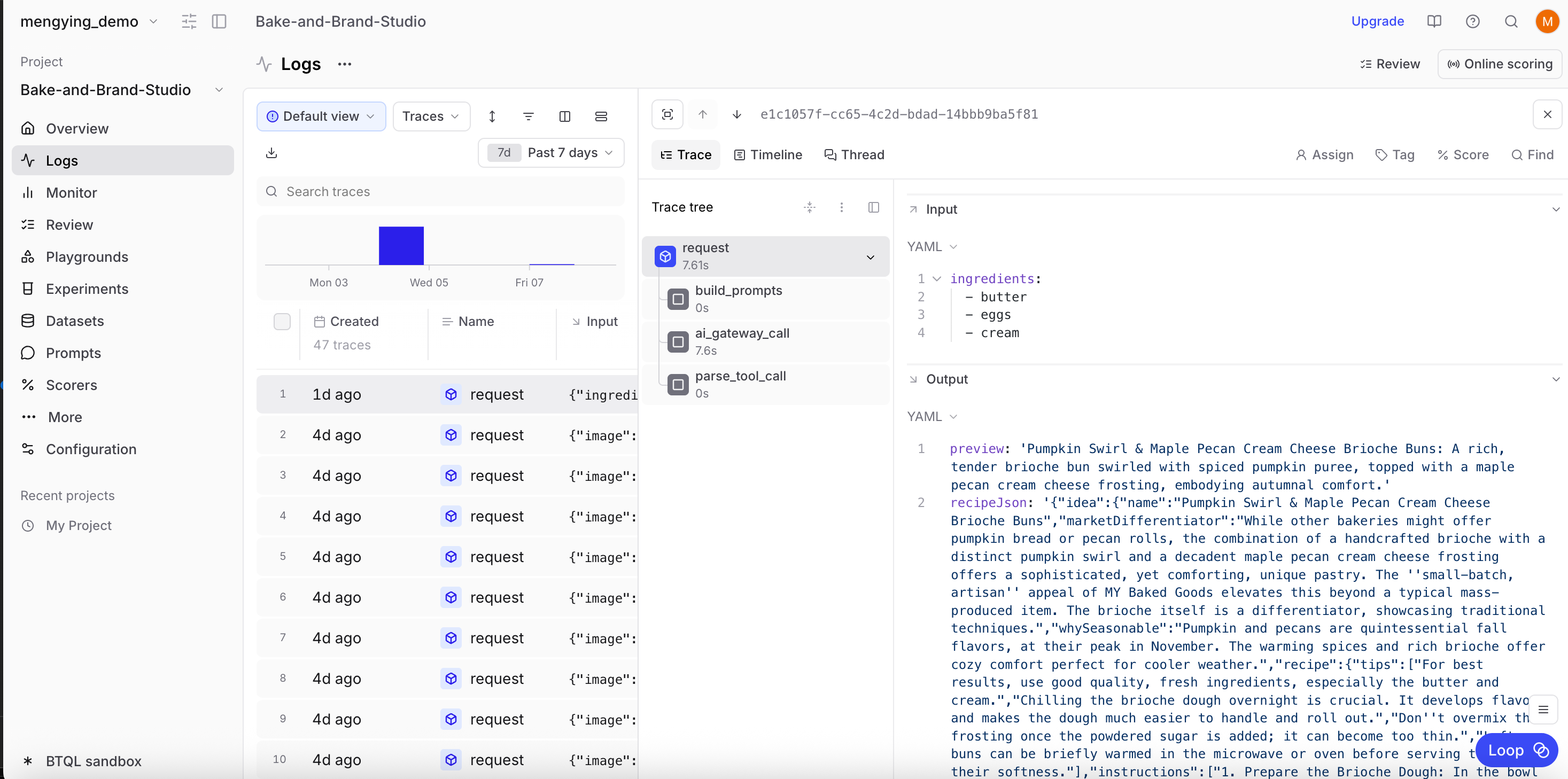 Navigate to your Braintrust project and select the **Logs** tab to view traces. Confirm that the traces are streaming in real time. The `ai_gateway_call` child span will show system and user prompts.
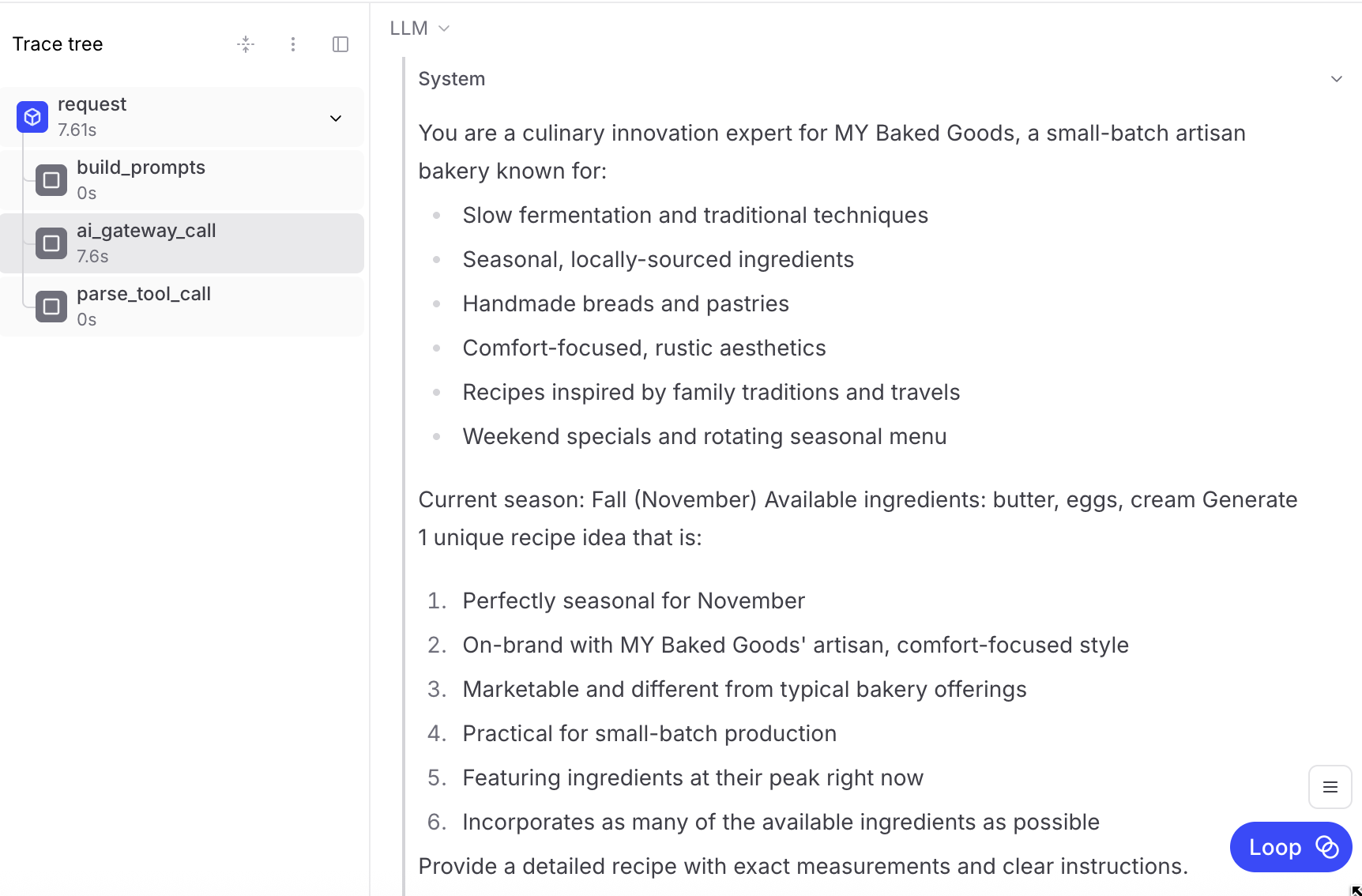 Each trace will include detailed information about:
* Request inputs and outputs
* AI model interactions with prompts
* Processing steps with latency
* Complete request/response payloads
## Running eval experiments
Once logging is live, you can run evals to compare prompt or agent changes and score results:
1. Create a playground directly from Logs
2. Ask Braintrust's AI assistant to add custom scorers
3. Experiment with different models and prompts
4. Compare results side-by-side
## Running remote evals
You can use remote evals to tweak prompts or tool calls locally, then test your cloud function as if it were deployed.
1. Ask Lovable for the exact Supabase Edge Function URL and substitute it below
2. Run a local dev server
3. Expose it via Cloudflare Tunnel
4. Register the tunnel URL in Braintrust
```typescript theme={"theme":{"light":"github-light","dark":"github-dark-dimmed"}}
import { Eval } from "braintrust";
import { z } from "zod";
export default Eval("My Function Remote Eval", {
task: async (input, { parameters }) => {
const functionUrl = parameters?.functionUrl || input?.functionUrl;
const systemPrompt =
parameters?.systemPrompt || input?.systemPrompt || "You are a helpful assistant.";
const userPrompt = parameters?.userPrompt || input?.userPrompt;
if (!functionUrl) throw new Error("Missing functionUrl");
const resp = await fetch(functionUrl, {
method: "POST",
headers: { "Content-Type": "application/json" },
body: JSON.stringify(input || {}),
});
if (!resp.ok) throw new Error(`Function error ${resp.status}: ${await resp.text()}`);
return await resp.json();
},
scores: [],
parameters: {
functionUrl: z.string().describe("Supabase Edge Function URL").default("https://your-project.supabase.co/functions/v1/your-function"),
},
});
```
To run the remote eval, start the dev server and tunnel:
```typescript theme={"theme":{"light":"github-light","dark":"github-dark-dimmed"}}
npx braintrust eval my-function-eval.js --dev --dev-host 0.0.0.0 --dev-port 8400
npx cloudflared tunnel --url http://localhost:8400
```
Then, register the tunnel URL. You can do this from a playground or your project configuration.
Add the tunnel URL (for example, `https://xyz-abc-123.trycloudflare.com`):
Each trace will include detailed information about:
* Request inputs and outputs
* AI model interactions with prompts
* Processing steps with latency
* Complete request/response payloads
## Running eval experiments
Once logging is live, you can run evals to compare prompt or agent changes and score results:
1. Create a playground directly from Logs
2. Ask Braintrust's AI assistant to add custom scorers
3. Experiment with different models and prompts
4. Compare results side-by-side
## Running remote evals
You can use remote evals to tweak prompts or tool calls locally, then test your cloud function as if it were deployed.
1. Ask Lovable for the exact Supabase Edge Function URL and substitute it below
2. Run a local dev server
3. Expose it via Cloudflare Tunnel
4. Register the tunnel URL in Braintrust
```typescript theme={"theme":{"light":"github-light","dark":"github-dark-dimmed"}}
import { Eval } from "braintrust";
import { z } from "zod";
export default Eval("My Function Remote Eval", {
task: async (input, { parameters }) => {
const functionUrl = parameters?.functionUrl || input?.functionUrl;
const systemPrompt =
parameters?.systemPrompt || input?.systemPrompt || "You are a helpful assistant.";
const userPrompt = parameters?.userPrompt || input?.userPrompt;
if (!functionUrl) throw new Error("Missing functionUrl");
const resp = await fetch(functionUrl, {
method: "POST",
headers: { "Content-Type": "application/json" },
body: JSON.stringify(input || {}),
});
if (!resp.ok) throw new Error(`Function error ${resp.status}: ${await resp.text()}`);
return await resp.json();
},
scores: [],
parameters: {
functionUrl: z.string().describe("Supabase Edge Function URL").default("https://your-project.supabase.co/functions/v1/your-function"),
},
});
```
To run the remote eval, start the dev server and tunnel:
```typescript theme={"theme":{"light":"github-light","dark":"github-dark-dimmed"}}
npx braintrust eval my-function-eval.js --dev --dev-host 0.0.0.0 --dev-port 8400
npx cloudflared tunnel --url http://localhost:8400
```
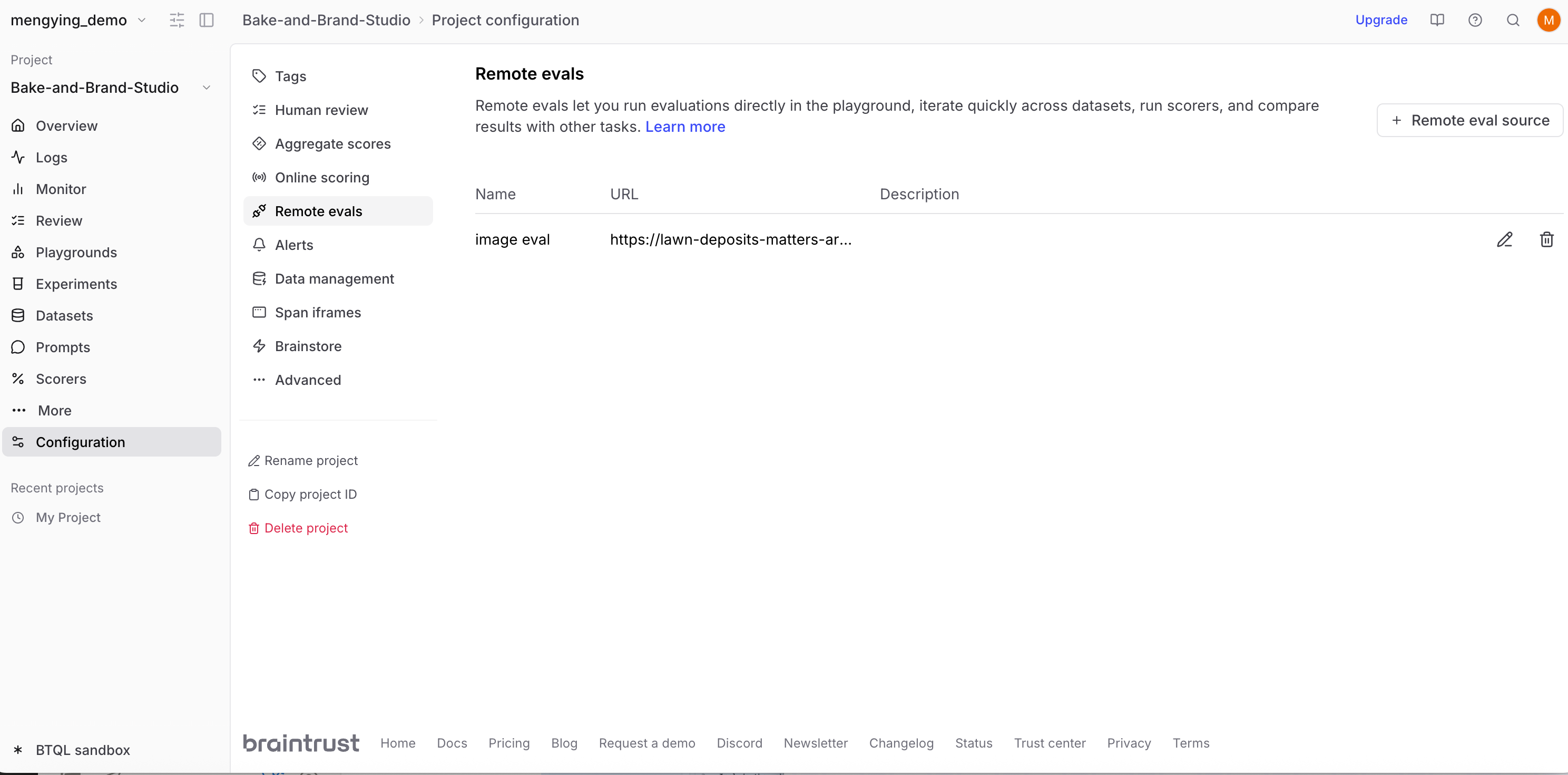
Then, register the tunnel URL. You can do this from a playground or your project configuration.
Add the tunnel URL (for example, `https://xyz-abc-123.trycloudflare.com`):
 And run your remote eval:
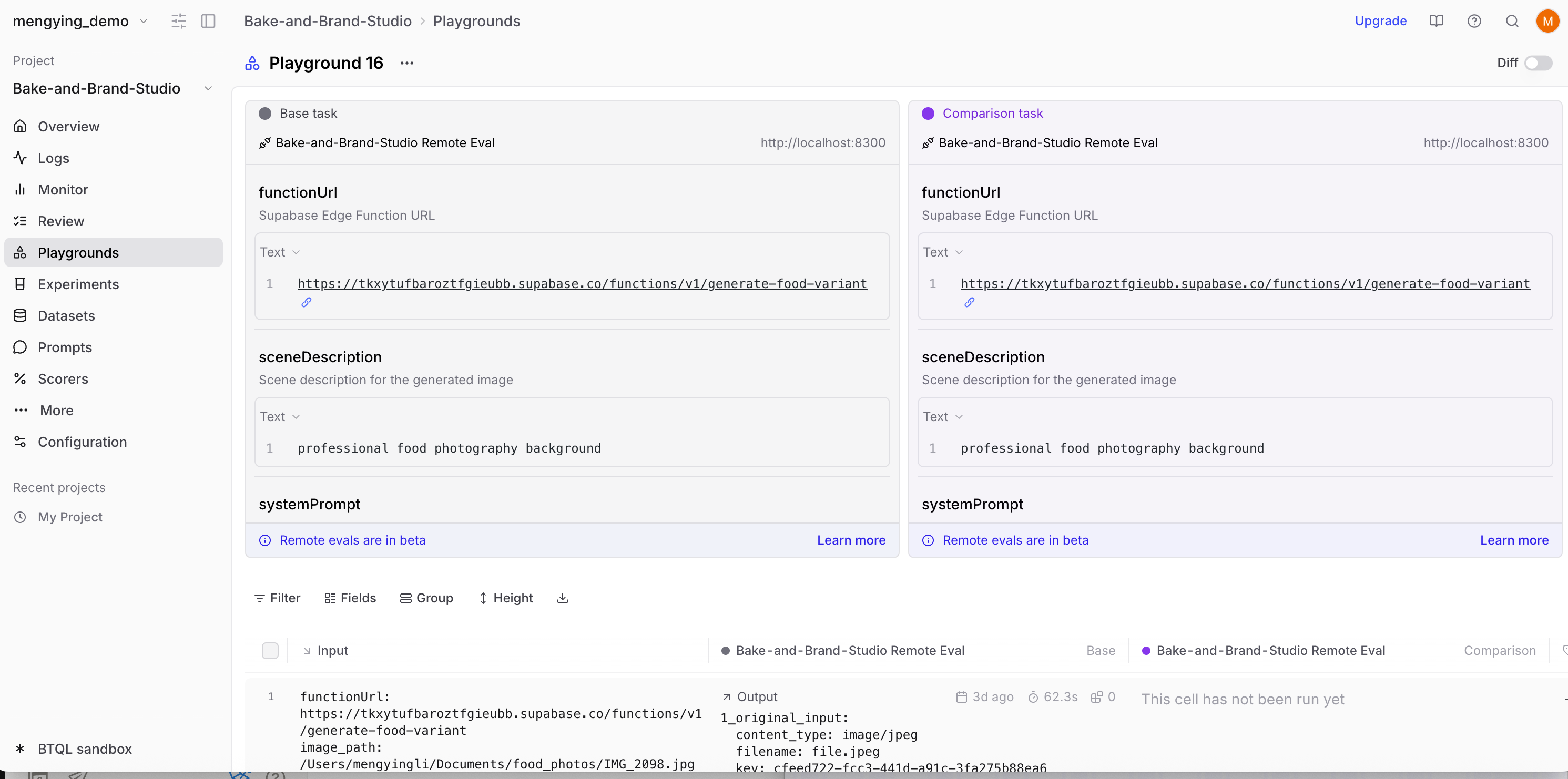 Each time you'd like to run a remote eval, make sure you have the dev server running, Cloudflare Tunnel active, and Braintrust configured with the current tunnel URL.
## Troubleshooting
You can ask Lovable to help you troubleshoot in the chat window.
### Traces not showing up
* Verify secret name in Supabase matches your code
* Ensure Braintrust `projectName` is exact
* Look for "\[Braintrust]" console messages
* Ensure every span calls `await span.end()`
### Images not displaying
* Log full base64 data URLs
* Keep payloads under \~10 MB per trace
* Use format: `data:image/png;base64,...`
* Don't log booleans — include the actual data
### Errors in logs
* Verify SDK import succeeded
* Check that API key is valid
* Ensure `asyncFlush: false` is set
* Confirm outbound network access is allowed from Supabase Edge
## Next steps
Now that you have a Lovable app with full observability and evaluation capabilities, you can:
* Create [custom scorers](/evaluate/write-scorers) to evaluate AI quality against specific criteria
* Build [evaluation datasets](/annotate/datasets/create#promote-traces-from-logs) from production logs to continuously improve your app
* Use the [playground](/evaluate/playgrounds) to experiment with prompts before deploying changes
* Add more AI features to your Lovable app with confidence in their quality
Each time you'd like to run a remote eval, make sure you have the dev server running, Cloudflare Tunnel active, and Braintrust configured with the current tunnel URL.
## Troubleshooting
You can ask Lovable to help you troubleshoot in the chat window.
### Traces not showing up
* Verify secret name in Supabase matches your code
* Ensure Braintrust `projectName` is exact
* Look for "\[Braintrust]" console messages
* Ensure every span calls `await span.end()`
### Images not displaying
* Log full base64 data URLs
* Keep payloads under \~10 MB per trace
* Use format: `data:image/png;base64,...`
* Don't log booleans — include the actual data
### Errors in logs
* Verify SDK import succeeded
* Check that API key is valid
* Ensure `asyncFlush: false` is set
* Confirm outbound network access is allowed from Supabase Edge
## Next steps
Now that you have a Lovable app with full observability and evaluation capabilities, you can:
* Create [custom scorers](/evaluate/write-scorers) to evaluate AI quality against specific criteria
* Build [evaluation datasets](/annotate/datasets/create#promote-traces-from-logs) from production logs to continuously improve your app
* Use the [playground](/evaluate/playgrounds) to experiment with prompts before deploying changes
* Add more AI features to your Lovable app with confidence in their quality