> ## Documentation Index
> Fetch the complete documentation index at: https://braintrust.dev/docs/llms.txt
> Use this file to discover all available pages before exploring further.
# Create datasets
> Build datasets from CSV uploads, the SDK, production logs, user feedback, traces, or Loop. Includes multimodal records like images and attachments.
Get test cases into a dataset from whichever source fits your workflow. Use file uploads for existing data, the SDK to populate programmatically, production logs and user feedback to capture real interactions, traces to promote specific examples, or Loop to generate from patterns.
Upload CSV/JSON
The fastest way to create a dataset is uploading a CSV or JSON file:
1. Go to [** Datasets**](https://www.braintrust.dev/app/~/datasets).
2. If there are existing datasets, click **+ Dataset**. Otherwise, click **Upload CSV/JSON**.
3. Drag and drop your file in the **Upload dataset** dialog.
4. Columns automatically map to the `input` field. Drag and drop them into different categories as needed:
* **Input**: Fields used as inputs for your task.
* **Expected**: Ground truth or ideal outputs for scoring.
* **Metadata**: Additional context for filtering and grouping.
* **Tags**: Labels for organizing and filtering individual records. When you categorize columns as tags, they're automatically added to your project's [tag configuration](/admin/projects#add-tags). These are per-record tags, distinct from [dataset-level tags](/annotate/datasets/manage#tag-and-star-datasets) that organize datasets in the list.
* **Do not import**: Exclude columns from the dataset.
The preview table updates in real-time as you move columns between categories, showing exactly how your dataset will be structured.
5. Click **Import**.
If your data includes an `id` field, duplicate rows will be deduplicated, with only the last occurrence of each ID kept.
## Create via SDK
Create datasets programmatically and populate them with records. The approach varies by language:
* **TypeScript/Python**: Use the high-level `initDataset()` / `init_dataset()` method which automatically creates datasets and provides simple `insert()` operations.
* **Go/Ruby**: Use lower-level API methods that require initializing an API client and explicitly managing dataset creation and record insertion.
```typescript theme={"theme":{"light":"github-light","dark":"github-dark-dimmed"}}
import { initDataset } from "braintrust";
async function main() {
// Initialize dataset (creates it if it doesn't exist)
const dataset = initDataset("My App", { dataset: "Customer Support" });
// Insert records with input, expected output, and metadata
dataset.insert({
input: { question: "How do I reset my password?" },
expected: { answer: "Click 'Forgot Password' on the login page." },
metadata: { category: "authentication", difficulty: "easy" },
});
dataset.insert({
input: { question: "What's your refund policy?" },
expected: { answer: "Full refunds within 30 days of purchase." },
metadata: { category: "billing", difficulty: "easy" },
});
dataset.insert({
input: { question: "How do I integrate your API with NextJS?" },
expected: { answer: "Install the SDK and use our React hooks." },
metadata: { category: "technical", difficulty: "medium" },
});
// Flush to ensure all records are saved
await dataset.flush();
console.log("Dataset created with 3 records");
}
main();
```
```python theme={"theme":{"light":"github-light","dark":"github-dark-dimmed"}}
import braintrust
# Initialize dataset (creates it if it doesn't exist)
dataset = braintrust.init_dataset(project="My App", name="Customer Support")
# Insert records with input, expected output, and metadata
dataset.insert(
input={"question": "How do I reset my password?"},
expected={"answer": "Click 'Forgot Password' on the login page."},
metadata={"category": "authentication", "difficulty": "easy"},
)
dataset.insert(
input={"question": "What's your refund policy?"},
expected={"answer": "Full refunds within 30 days of purchase."},
metadata={"category": "billing", "difficulty": "easy"},
)
dataset.insert(
input={"question": "How do I integrate your API with NextJS?"},
expected={"answer": "Install the SDK and use our React hooks."},
metadata={"category": "technical", "difficulty": "medium"},
)
# Flush to ensure all records are saved
dataset.flush()
print("Dataset created with 3 records")
```
```go theme={"theme":{"light":"github-light","dark":"github-dark-dimmed"}}
package main
import (
"context"
"fmt"
"log"
"os"
"github.com/braintrustdata/braintrust-sdk-go/api"
"github.com/braintrustdata/braintrust-sdk-go/api/datasets"
"github.com/braintrustdata/braintrust-sdk-go/api/projects"
)
func main() {
ctx := context.Background()
// Initialize API client
client := api.NewClient(os.Getenv("BRAINTRUST_API_KEY"))
// Get or create project
project, err := client.Projects().Create(ctx, projects.CreateParams{
Name: "My App",
})
if err != nil {
log.Fatal(err)
}
// Create dataset
dataset, err := client.Datasets().Create(ctx, datasets.CreateParams{
ProjectID: project.ID,
Name: "Customer Support",
})
if err != nil {
log.Fatal(err)
}
// Insert records with input, expected output, and metadata
events := []datasets.Event{
{
Input: map[string]interface{}{
"question": "How do I reset my password?",
},
Expected: map[string]interface{}{
"answer": "Click 'Forgot Password' on the login page.",
},
Metadata: map[string]interface{}{
"category": "authentication",
"difficulty": "easy",
},
},
{
Input: map[string]interface{}{
"question": "What's your refund policy?",
},
Expected: map[string]interface{}{
"answer": "Full refunds within 30 days of purchase.",
},
Metadata: map[string]interface{}{
"category": "billing",
"difficulty": "easy",
},
},
{
Input: map[string]interface{}{
"question": "How do I integrate your API with NextJS?",
},
Expected: map[string]interface{}{
"answer": "Install the SDK and use our React hooks.",
},
Metadata: map[string]interface{}{
"category": "technical",
"difficulty": "medium",
},
},
}
err = client.Datasets().InsertEvents(ctx, dataset.ID, events)
if err != nil {
log.Fatal(err)
}
fmt.Println("Dataset created with 3 records")
}
```
```ruby theme={"theme":{"light":"github-light","dark":"github-dark-dimmed"}}
require "braintrust"
# Initialize Braintrust
Braintrust.init
api = Braintrust::API.new
# Get or create project
project = api.projects.list.find { |p| p["name"] == "My App" }
if project.nil?
project = api.projects.create(name: "My App")
end
# Create dataset
response = api.datasets.create(
project_name: "My App",
name: "Customer Support",
description: "Customer support Q&A dataset"
)
dataset_id = response["dataset"]["id"]
# Insert records with input, expected output, and metadata
events = [
{
input: {question: "How do I reset my password?"},
expected: {answer: "Click 'Forgot Password' on the login page."},
metadata: {category: "authentication", difficulty: "easy"}
},
{
input: {question: "What's your refund policy?"},
expected: {answer: "Full refunds within 30 days of purchase."},
metadata: {category: "billing", difficulty: "easy"}
},
{
input: {question: "How do I integrate your API with NextJS?"},
expected: {answer: "Install the SDK and use our React hooks."},
metadata: {category: "technical", difficulty: "medium"}
}
]
api.datasets.insert(id: dataset_id, events: events)
puts "Dataset created with 3 records"
```
## Create via CLI
Use the [`bt datasets create`](/reference/cli/datasets#bt-datasets-create) CLI command to create datasets directly from the terminal. Accepts JSONL files, stdin, or inline JSON rows.
```bash theme={"theme":{"light":"github-light","dark":"github-dark-dimmed"}}
# Create an empty dataset
bt datasets create my-dataset
# Seed from a JSONL file
bt datasets create my-dataset --file records.jsonl
# Seed from stdin
cat records.jsonl | bt datasets create my-dataset
# Seed with inline JSON rows
bt datasets create my-dataset --rows '[{"id":"case-1","input":{"text":"hi"},"expected":"hello"}]'
```
Rows that omit an `id` field get auto-generated stable IDs. Accepted top-level record fields are `id`, `input`, `expected`, `metadata`, `tags`, and `origin`.
## Promote traces from logs
You can add a trace to a dataset by mapping fields from a production log span into dataset row format. The span's `input` maps to the dataset row's `input`, and the span's `output` typically becomes the row's `expected` value. This is useful when you see a notably good or bad response in production and want to capture it as a test case. You can add traces to datasets with the Braintrust UI or programmatically with the Braintrust API.
To promote logs in bulk, define the mapping once and re-run it as a [dataset pipeline](/annotate/datasets/pipelines).
Add traces to a dataset using the Braintrust UI:
1. Go to [** Logs**](https://www.braintrust.dev/app/~/logs).
2. Select the traces you want to add.
3. Select **+ Dataset** and then the dataset you want to add to.
Use the [BTQL endpoint](/api-reference#query-logs-and-experiments) to fetch an existing span from your production logs, then insert it into a dataset using the [dataset insert API](/api-reference/datasets/insert-dataset-events). The `origin` field links the dataset row back to the source span, creating a **Log** button in the Origin column.
```typescript theme={"theme":{"light":"github-light","dark":"github-dark-dimmed"}}
import { initDataset } from "braintrust";
const projectId = "";
const spanId = "";
// Fetch the span from project logs
const btqlResponse = await fetch("https://api.braintrust.dev/btql", {
method: "POST",
headers: {
Authorization: `Bearer ${process.env.BRAINTRUST_API_KEY}`,
"Content-Type": "application/json",
},
body: JSON.stringify({
query: `SELECT id, input, output FROM project_logs('${projectId}') WHERE span_id = '${spanId}' LIMIT 1`,
}),
});
const { data } = await btqlResponse.json();
const span = data[0];
// Insert into the dataset, mapping span fields to dataset row format
const dataset = initDataset("My App", { dataset: "Customer Support" });
const datasetId = await dataset.id;
await fetch(`https://api.braintrust.dev/v1/dataset/${datasetId}/insert`, {
method: "POST",
headers: {
Authorization: `Bearer ${process.env.BRAINTRUST_API_KEY}`,
"Content-Type": "application/json",
},
body: JSON.stringify({
events: [
{
input: span.input,
// span.output is the raw output from your app — extract the relevant
// value for your use case (e.g. span.output[0].message.content for
// OpenAI chat completions)
expected: span.output,
origin: {
object_type: "project_logs",
object_id: projectId,
// span.id is the row UUID from the SELECT above — what the Log button expects.
id: span.id,
},
},
],
}),
});
```
```python theme={"theme":{"light":"github-light","dark":"github-dark-dimmed"}}
import os
import httpx
import braintrust
project_id = ""
span_id = ""
# Fetch the span from project logs
btql_response = httpx.post(
"https://api.braintrust.dev/btql",
headers={
"Authorization": f"Bearer {os.environ['BRAINTRUST_API_KEY']}",
"Content-Type": "application/json",
},
json={
"query": f"SELECT id, input, output FROM project_logs('{project_id}') WHERE span_id = '{span_id}' LIMIT 1",
},
)
span = btql_response.json()["data"][0]
# Insert into the dataset, mapping span fields to dataset row format
dataset = braintrust.init_dataset(project="My App", name="Customer Support")
dataset_id = dataset.id
httpx.post(
f"https://api.braintrust.dev/v1/dataset/{dataset_id}/insert",
headers={
"Authorization": f"Bearer {os.environ['BRAINTRUST_API_KEY']}",
"Content-Type": "application/json",
},
json={
"events": [
{
"input": span["input"],
# span["output"] is the raw output from your app — extract the relevant
# value for your use case (e.g. span["output"][0]["message"]["content"]
# for OpenAI chat completions)
"expected": span["output"],
"origin": {
"object_type": "project_logs",
"object_id": project_id,
# span["id"] is the row UUID from the SELECT above — what the Log button expects.
"id": span["id"],
},
},
],
},
)
```
## Curate from topics
Topic classifications turn logs into structured signals you can filter by, such as task type, sentiment, or error category. Filter logs by classification, then promote the matching traces to a dataset for targeted evaluation.
See [Build datasets from topics](/observe/topics/act-on-findings#build-datasets-from-topics) for the full workflow.
## Curate from user feedback
User feedback from production provides valuable test cases that reflect real user interactions. Use feedback to create datasets from highly-rated examples or problematic cases.
See [Capture user feedback](/instrument/user-feedback) for implementation details on logging feedback programmatically.
To build datasets from feedback:
1. Filter logs by feedback scores using the **Filter** menu:
* `scores.user_rating > 0.8` (SQL) or `filter: scores.user_rating > 0.8` (BTQL) for highly-rated examples
* `metadata.thumbs_up = false` for negative feedback
* `comment IS NOT NULL and scores.correctness < 0.5` for low-scoring feedback with comments
2. Select the traces you want to include.
3. Select **Add to dataset**.
4. Choose an existing dataset or create a new one.
You can also ask Loop to create datasets based on feedback patterns, such as "Create a dataset from logs with positive feedback" or "Build a dataset from cases where users clicked thumbs down."
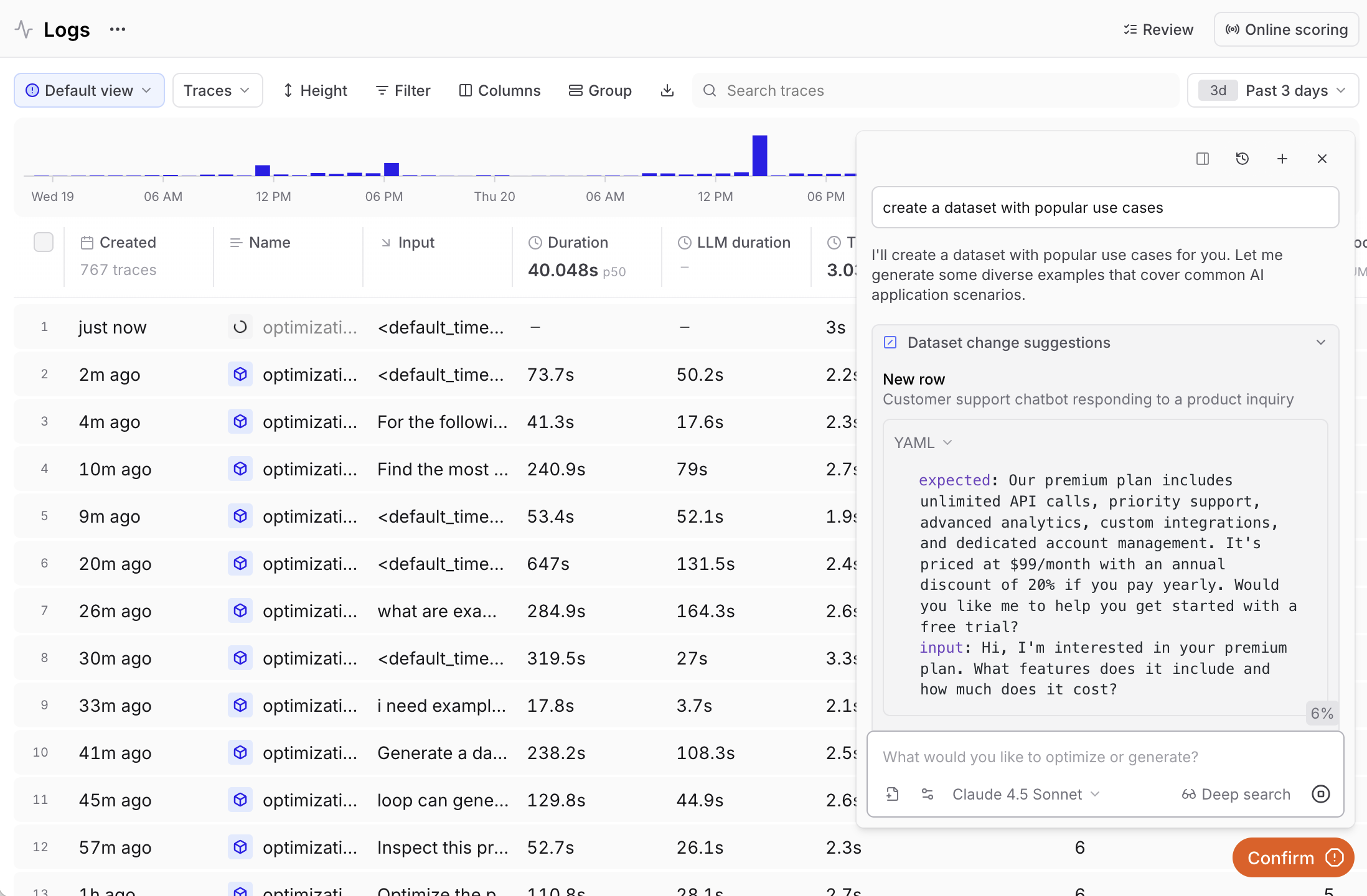
## Generate with Loop
Ask Loop to create a dataset based on your logs or specific criteria.
Example queries:
* "Generate a dataset from the highest-scoring examples in this experiment"
* "Create a dataset with the most common inputs in the logs"
 ## Log from production
Track user feedback from your application:
```typescript theme={"theme":{"light":"github-light","dark":"github-dark-dimmed"}}
import { initDataset, Dataset } from "braintrust";
class MyApplication {
private dataset: Dataset | undefined = undefined;
async initApp() {
this.dataset = await initDataset("My App", { dataset: "logs" });
}
async logUserExample(
input: any,
expected: any,
userId: string,
thumbsUp: boolean,
) {
if (this.dataset) {
this.dataset.insert({
input,
expected,
metadata: { userId, thumbsUp },
});
}
}
}
```
```python theme={"theme":{"light":"github-light","dark":"github-dark-dimmed"}}
import braintrust
class MyApplication:
def init_app(self):
self.dataset = braintrust.init_dataset(project="My App", name="logs")
def log_user_example(self, input, expected, user_id, thumbs_up):
if self.dataset:
self.dataset.insert(
input=input,
expected=expected,
metadata={"user_id": user_id, "thumbs_up": thumbs_up},
)
```
## Multimodal datasets
You can store and process images and other file types in your datasets. There are several ways to use files in Braintrust:
* **Image URLs** - Keep datasets lightweight by referencing external images. Best for large images and fastest to sync.
* **Base64** - Encode images directly in records. Self-contained but inflates dataset size.
* **Attachments** (easiest to manage) - Store files directly in Braintrust.
* **External attachments** - Reference files in your own object stores.
For large images, use image URLs to keep datasets lightweight. To keep all data within Braintrust, use attachments. Attachments support any file type including images, audio, and PDFs.
```typescript theme={"theme":{"light":"github-light","dark":"github-dark-dimmed"}}
import { Attachment, initDataset } from "braintrust";
import path from "node:path";
async function createPdfDataset(): Promise {
const dataset = initDataset({
project: "Project with PDFs",
dataset: "My PDF Dataset",
});
for (const filename of ["example.pdf"]) {
dataset.insert({
input: {
file: new Attachment({
filename,
contentType: "application/pdf",
data: path.join("files", filename),
}),
},
});
}
await dataset.flush();
}
createPdfDataset();
```
```python theme={"theme":{"light":"github-light","dark":"github-dark-dimmed"}}
import os
from braintrust import Attachment, init_dataset
def create_pdf_dataset() -> None:
dataset = init_dataset("Project with PDFs", "My PDF Dataset")
for filename in ["example.pdf"]:
dataset.insert(
input={
"file": Attachment(
filename=filename,
content_type="application/pdf",
data=os.path.join("files", filename),
)
},
)
dataset.flush()
create_pdf_dataset()
```
## Next steps
* [Manage datasets](/annotate/datasets/manage) — tag, snapshot, validate, and edit records.
* [Use in evaluations](/annotate/datasets/use-in-evaluations) with `Eval()`.
* [Track performance](/annotate/datasets/track-performance) across experiments.
## Log from production
Track user feedback from your application:
```typescript theme={"theme":{"light":"github-light","dark":"github-dark-dimmed"}}
import { initDataset, Dataset } from "braintrust";
class MyApplication {
private dataset: Dataset | undefined = undefined;
async initApp() {
this.dataset = await initDataset("My App", { dataset: "logs" });
}
async logUserExample(
input: any,
expected: any,
userId: string,
thumbsUp: boolean,
) {
if (this.dataset) {
this.dataset.insert({
input,
expected,
metadata: { userId, thumbsUp },
});
}
}
}
```
```python theme={"theme":{"light":"github-light","dark":"github-dark-dimmed"}}
import braintrust
class MyApplication:
def init_app(self):
self.dataset = braintrust.init_dataset(project="My App", name="logs")
def log_user_example(self, input, expected, user_id, thumbs_up):
if self.dataset:
self.dataset.insert(
input=input,
expected=expected,
metadata={"user_id": user_id, "thumbs_up": thumbs_up},
)
```
## Multimodal datasets
You can store and process images and other file types in your datasets. There are several ways to use files in Braintrust:
* **Image URLs** - Keep datasets lightweight by referencing external images. Best for large images and fastest to sync.
* **Base64** - Encode images directly in records. Self-contained but inflates dataset size.
* **Attachments** (easiest to manage) - Store files directly in Braintrust.
* **External attachments** - Reference files in your own object stores.
For large images, use image URLs to keep datasets lightweight. To keep all data within Braintrust, use attachments. Attachments support any file type including images, audio, and PDFs.
```typescript theme={"theme":{"light":"github-light","dark":"github-dark-dimmed"}}
import { Attachment, initDataset } from "braintrust";
import path from "node:path";
async function createPdfDataset(): Promise {
const dataset = initDataset({
project: "Project with PDFs",
dataset: "My PDF Dataset",
});
for (const filename of ["example.pdf"]) {
dataset.insert({
input: {
file: new Attachment({
filename,
contentType: "application/pdf",
data: path.join("files", filename),
}),
},
});
}
await dataset.flush();
}
createPdfDataset();
```
```python theme={"theme":{"light":"github-light","dark":"github-dark-dimmed"}}
import os
from braintrust import Attachment, init_dataset
def create_pdf_dataset() -> None:
dataset = init_dataset("Project with PDFs", "My PDF Dataset")
for filename in ["example.pdf"]:
dataset.insert(
input={
"file": Attachment(
filename=filename,
content_type="application/pdf",
data=os.path.join("files", filename),
)
},
)
dataset.flush()
create_pdf_dataset()
```
## Next steps
* [Manage datasets](/annotate/datasets/manage) — tag, snapshot, validate, and edit records.
* [Use in evaluations](/annotate/datasets/use-in-evaluations) with `Eval()`.
* [Track performance](/annotate/datasets/track-performance) across experiments.